Introducing SILENTCHAIN AI Community Edition v1.1.3
We’re excited to announce the official release of SILENTCHAIN AI™ Community Edition v1.1.3 — a free, AI-powered Burp Suite extension that brings intelligent vulnerability analysis to your penetration testing workflow. Whether you’re a professional pentester, red teamer, bug bounty hunter, or security researcher, SILENTCHAIN AI is designed to help you find vulnerabilities faster and with greater precision.
Download it now from GitHub or learn more at silentchain.ai.
What is SILENTCHAIN AI?
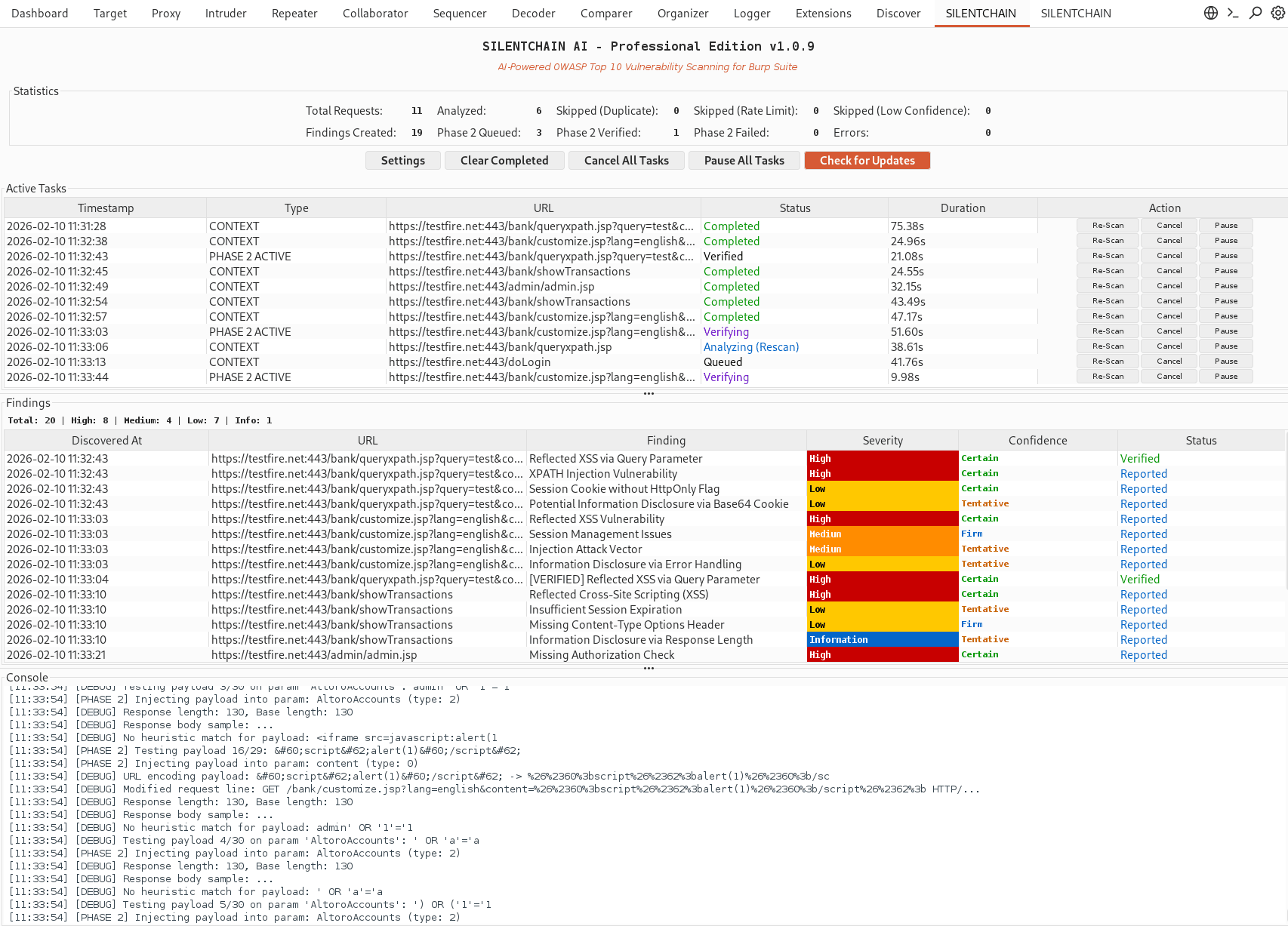
SILENTCHAIN AI is a Burp Suite extension that leverages large language models (LLMs) to perform intelligent, context-aware passive analysis of HTTP traffic. Unlike traditional scanners that rely on static signatures and pattern matching, SILENTCHAIN uses AI to understand application logic and identify security vulnerabilities that conventional tools miss.
The Community Edition provides full passive analysis capabilities completely free — no subscriptions, no usage limits, no strings attached.
Key Features
- 🧠 AI-Powered Vulnerability Detection — Leverages state-of-the-art language models including Ollama, OpenAI GPT-4, Anthropic Claude, and Google Gemini for context-aware security analysis that goes beyond simple pattern matching.
- ⚡ Real-Time Passive Scanning — Automatically analyzes all HTTP traffic flowing through Burp Proxy in real time. Findings appear instantly in your dashboard and Burp’s native Issue Activity panel.
- 🎯 OWASP Top 10 Coverage — Comprehensive detection of OWASP Top 10 vulnerabilities including SQL injection, cross-site scripting (XSS), broken authentication, insecure direct object references (IDOR), security misconfigurations, and more.
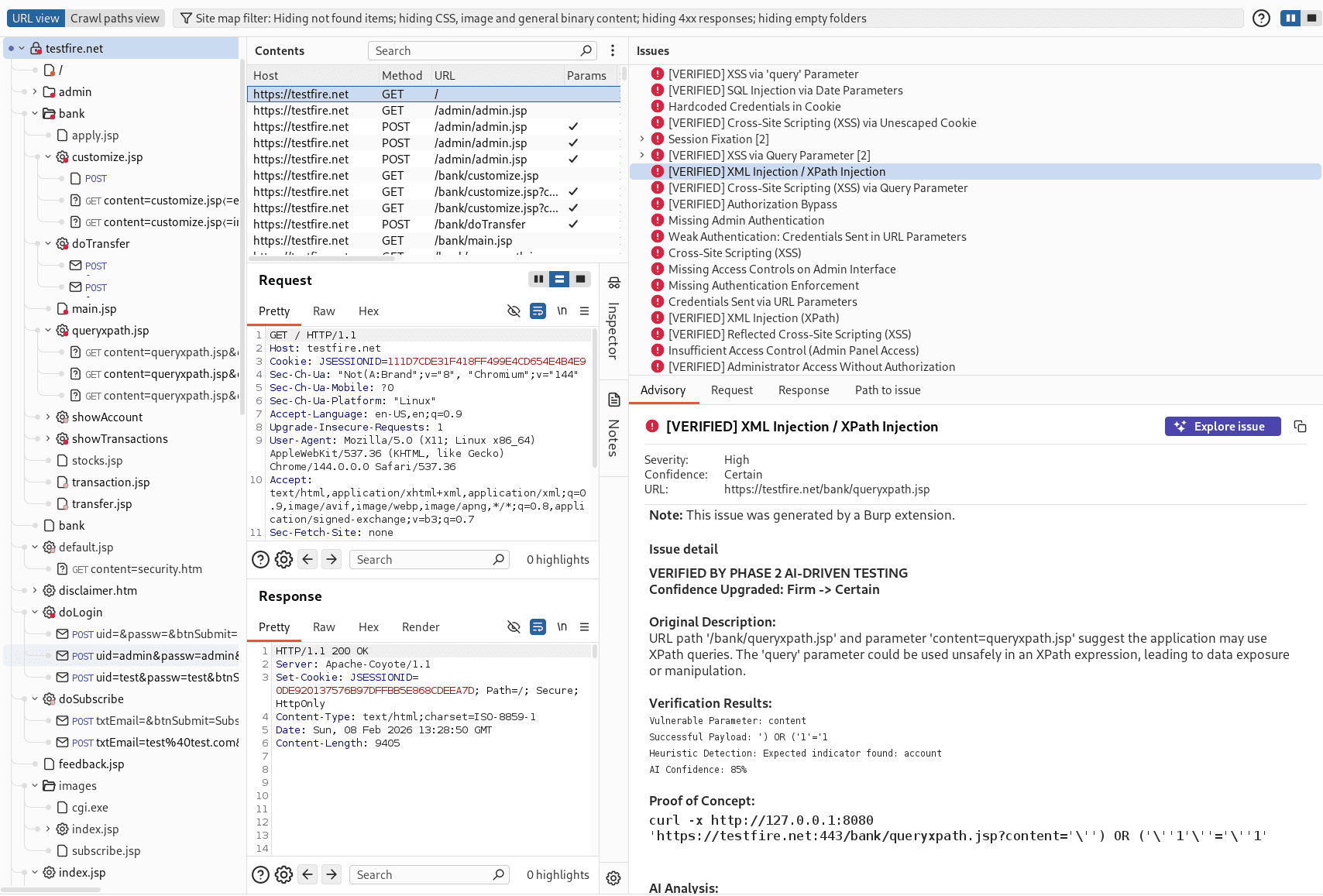
- 📊 Professional Reporting — Generates detailed findings with CWE mappings, OWASP references, severity ratings, confidence scores, affected parameters, and actionable remediation guidance.
- 🔒 Privacy-First Architecture — Use Ollama for 100% local AI processing with zero external data transmission. Your target data never leaves your machine.
- 🎨 Modern Professional UI — Intuitive dashboard with live task tracking, severity-coded findings management, integrated console logging, and statistics overview.
- 🔄 Smart Deduplication — Intelligent deduplication prevents redundant findings for the same URL/parameter combinations, keeping your results clean and actionable.
- 🖱️ Context Menu Integration — Right-click any request in Proxy History, Site Map, or Repeater to force AI analysis on demand.
Multi-AI Provider Support
SILENTCHAIN AI supports four major AI providers out of the box, giving you the flexibility to choose the model that best fits your workflow and privacy requirements:
| Provider | Privacy | Cost | Best For |
|---|---|---|---|
| Ollama | 100% Local | Free | Sensitive targets, air-gapped environments |
| OpenAI (GPT-4) | Cloud | API Usage | Maximum detection accuracy |
| Claude (Anthropic) | Cloud | API Usage | Detailed analysis and reasoning |
| Google Gemini | Cloud | API Usage | Fast analysis with large context windows |
Vulnerability Detection Capabilities
SILENTCHAIN AI detects a comprehensive range of web application security vulnerabilities mapped to industry standards:
- Injection Attacks — SQL injection, NoSQL injection, command injection, LDAP injection, XPath injection
- Cross-Site Scripting (XSS) — Reflected, stored, and DOM-based XSS
- Authentication & Session Issues — Broken authentication, session management flaws, credential exposure
- Access Control — IDOR, broken authorization, privilege escalation
- Cryptographic Failures — Weak encryption, insecure TLS/SSL, sensitive data exposure
- Security Misconfigurations — Default credentials, debug endpoints, information disclosure
- XML External Entity (XXE) — XXE attacks and XML-based vulnerabilities
- Insecure Deserialization — Object deserialization flaws
- Vulnerable Components — Outdated libraries and known vulnerable dependencies
Getting Started in 3 Steps
SILENTCHAIN AI requires zero configuration to get started with Ollama. No API keys needed.
- Install Ollama and pull a model:
curl -fsSL https://ollama.ai/install.sh | sh ollama pull llama3 - Load the extension in Burp Suite:Download
silentchain_ai_community.pyfrom GitHub, then go to Extender → Extensions → Add and select the file. - Start browsing your target:Configure your target scope and browse normally. SILENTCHAIN automatically analyzes all in-scope traffic and surfaces findings in real time.
For detailed installation instructions, see the Installation Guide and Quick Start Guide.
Community Edition vs. Professional Edition
SILENTCHAINAI-burp-findings1
The Community Edition delivers powerful passive AI analysis completely free. The Professional Edition adds active verification capabilities for teams that need to confirm and validate findings automatically:
| Capability | Community (Free) | Professional |
|---|---|---|
| AI-Powered Passive Analysis | ✅ | ✅ |
| OWASP Top 10 Detection | ✅ | ✅ |
| Multi-AI Provider Support | ✅ | ✅ |
| Professional UI & CWE Reporting | ✅ | ✅ |
| Phase 2 Active Verification | ❌ | ✅ |
| WAF Detection & Evasion | ❌ | ✅ |
| Advanced Payload Libraries | ❌ | ✅ |
| OOB Testing & Burp Intruder Integration | ❌ | ✅ |
Join the Community
SILENTCHAIN AI is built for the security community and we want your feedback. Here’s how to get involved:
- ⭐ Star the repo on GitHub
- 🐛 Report bugs via GitHub Issues
- 💬 Join the discussion on GitHub Discussions
- 🐦 Follow us on social media @silentchainai
- 🌐 Visit silentchain.ai for documentation, pricing, and Professional Edition info
Download SILENTCHAIN AI Community Edition v1.1.3
Ready to transform your Burp Suite workflow with AI-powered vulnerability detection? Download the Community Edition today — it’s completely free.
Download Free on GitHub
Learn More at silentchain.ai
SILENTCHAIN AI™ is built with ❤️ for the security community. Use responsibly and only on systems you have explicit authorization to test.