
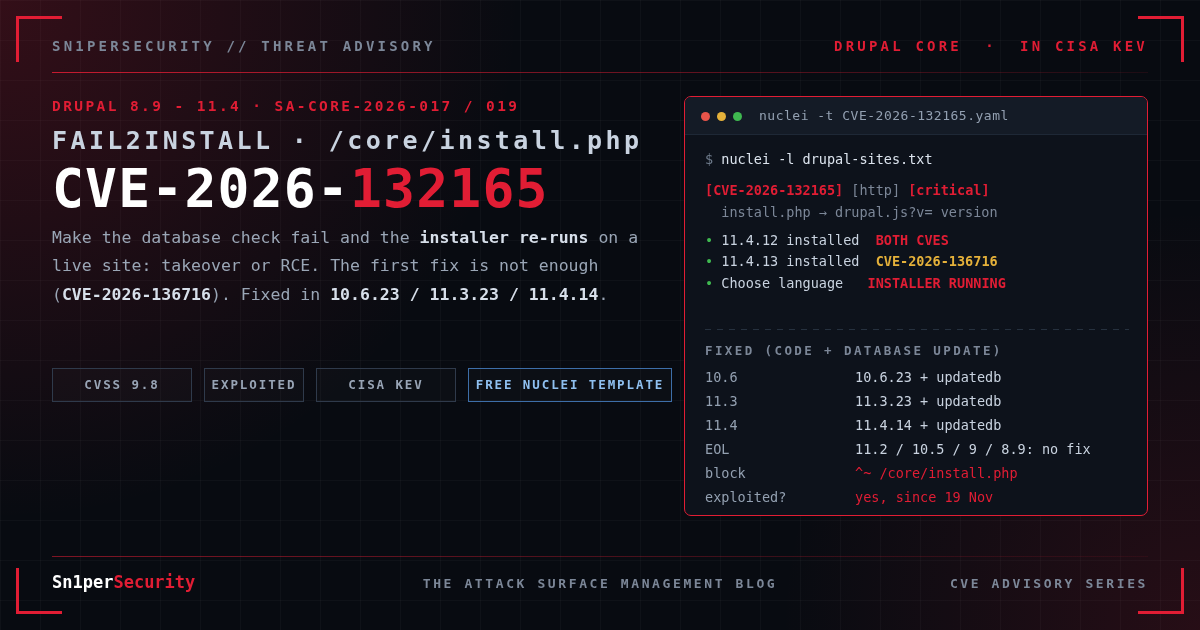

CVE-2026-132165, nicknamed Fail2Install, lets an unauthenticated attacker make Drupal core’s installer, /core/install.php, run again on a site that is already installed. Re-running the installer hands the attacker the site: a new administrator account, a new site configuration and, under some conditions, code execution on the server. Drupal fixed it on 18 November 2026 in SA-CORE-2026-017. Attacks on live sites started the next evening, CISA added it to the Known Exploited Vulnerabilities catalog on 24 November, and the federal deadline is today. A week after the first fix, Drupal published SA-CORE-2026-019 (CVE-2026-136716) because sites in “unusual or incomplete install states” were still being taken over, including production sites that had already applied the first patch. Drupal says that one is being exploited in the wild too, and CISA added it to KEV on 27 November.
This post is three things. First, a plain-English explanation of both CVEs, including the two steps most coverage misses: the first patch is not enough, and the second one comes with a database update that repairs sites already in the vulnerable state. Second, a free, non-destructive Nuclei template, tested against real Drupal 10.6 and 11.4 containers. It sends only the three GET requests Drupal’s own hardening guide uses, and it reads the exact core version from the installer page itself. Third, how to find every Drupal site on your attack surface whose installer still answers, and how to check whether one was already taken over. CVE-2026-132165 was discovered by Anthropic’s OSS Scanner (tracked as ANT-2026-GMRPK0BU) and reported with members of the Drupal Security Team. Kevin Gervot and Adam Kues of Searchlight Cyber found it independently and published the Fail2Install research showing it working on stock configurations.
One rule first: never “test” this by running the installer against a production site. A successful run is the takeover: it rewrites user 1 and the site settings. Everything in this post is a GET request that Drupal itself tells administrators to run.
Fail2Install at a glance
- CVEs / advisories: CVE-2026-132165 (SA-CORE-2026-017, 18 November 2026) and CVE-2026-136716 (SA-CORE-2026-019, 25 November 2026, the follow-up to an incomplete fix)
- CWE: CWE-306 Missing Authentication for Critical Function (CVE-2026-132165); CWE-754 Improper Check for Unusual or Exceptional Conditions (CVE-2026-136716)
- Impact: unauthenticated re-installation of an installed site, leading to site takeover and, on some setups, remote code execution
- Drupal risk score: SA-CORE-2026-017 Highly critical 20/25 (
AC:Complex/A:None/CI:All/II:All/E:Exploit/TD:Uncommon); SA-CORE-2026-019 Highly critical 21/25 (AC:Basic/A:None/CI:All/II:All/E:Exploit/TD:Uncommon) - CVSS v3.1: CVE-2026-132165 is 9.8 Critical from NVD (
AV:N/AC:L/PR:N/UI:N/S:U/C:H/I:H/A:H) but 8.1 High from CISA’s ADP, which rates attack complexity High. CVE-2026-136716 is 9.8 Critical from CISA’s ADP; NVD’s own analysis is in progress. - Affected: Drupal 8.9, 9, 10 and 11. CVE-2026-132165 is fixed in 10.6.22, 11.3.22 and 11.4.13. CVE-2026-136716 needs 10.6.23, 11.3.23 or 11.4.14.
- No fix: 11.2.x and older 11.x, 10.5.x and older, 9 and 8 are end of life
- Exploitation: both CVEs are in CISA KEV: CVE-2026-132165 added 24 November (due 27 November), CVE-2026-136716 added 27 November (due 30 November). Drupal reports attacks from 19 November 19:00 UTC, and says CVE-2026-136716 “is being exploited in the wild”. GitHub repositories claiming working exploits have appeared since 20 November.
- Fix now: block
/core/install.phpat the web server, update to 10.6.23 / 11.3.23 / 11.4.14, runupdate.phpordrush updatedb, then check user 1 and your admin accounts.
What is Fail2Install (CVE-2026-132165)?
Drupal ships its web installer at /core/install.php. It is supposed to do something only once, on a site with no database. Before showing the installation wizard, it checks whether Drupal is already installed by connecting to the configured database and looking for existing tables. If that check says “installed”, the installer shows a short “Drupal already installed” page and stops.
The flaw is in what happens when that check fails. According to Searchlight’s research, Drupal 8.9 and later treat a failed database check as “not installed”. The installer fails open. An attacker who can make the database check fail, even briefly, gets the real installer on a live production site. Searchlight showed how to cause that failure remotely on stock configurations. The method is to push the server into system limits (open file descriptors, database connections, TCP sockets), so the database connection fails during the check and works again a moment later. Drupal 7 and Drupal 8 before 8.9 are not affected, because they refuse to install if settings.php already contains database settings.
Once the installer is running, the attacker walks through it. The installer re-creates user 1 with the attacker’s name, email and password, which is a full site takeover. Searchlight also describes a shorter route to code execution. The installer accepts a SQLite database path, and that path can be made to land inside the web root with a .php name. On Apache, a weakness in the access rules in Drupal’s default .htaccess lets the resulting file be requested and executed. Drupal’s advisory notes that “some (but not all) exploit paths are mitigated if the web server cannot write to or change permissions on settings.php”.
CVE-2026-136716 is the part most coverage misses. SA-CORE-2026-017 closed the fail-open check, but sites that were already in an unusual or incomplete install state stayed exploitable. Drupal’s guidance says this state “is not apparent in the user interface”, that a production site “that has worked normally for years” can be in it, and that “updating to Drupal 10.6.22, 11.3.22 or 11.4.13 last week did not protect against this issue”. Drupal’s guidance is to do two things. The code update closes the hole. The database update, system_post_update_mark_installation_finished, repairs the recorded install state so the site behaves normally afterwards.
Where the sources disagree. Early coverage of SA-CORE-2026-017 (around 18 November) quoted a Drupal risk score of 18/25 and “no known exploits”. The advisory was revised after attacks began, and it now reads 20/25 with documented exploits since 19 November. For CVE-2026-132165, NVD scores attack complexity Low (9.8) while CISA’s ADP scores it High (8.1). Searchlight’s resource-exhaustion technique is not trivial, but it is documented and repeatable, so treat it as 9.8. CISA’s ADP record for CVE-2026-136716 first said exploitation “none” while Drupal’s advisory said it was being exploited in the wild. CISA settled that on 27 November by adding it to KEV.
Affected and fixed versions
| Branch | Vulnerable to CVE-2026-132165 | Fixed for CVE-2026-132165 | Vulnerable to CVE-2026-136716 | Fixed for both |
|---|---|---|---|---|
| 11.4.x | below 11.4.13 | 11.4.13 | below 11.4.14 | 11.4.14 + database update |
| 11.3.x | below 11.3.22 | 11.3.22 | below 11.3.23 | 11.3.23 + database update |
| 10.6.x | below 10.6.22 | 10.6.22 | below 10.6.23 | 10.6.23 + database update |
| 11.0 to 11.2, 10.0 to 10.5, 9, 8.9 | yes | none (end of life) | yes | none: upgrade, and block the installer until you do |
| 8.0 to 8.8, Drupal 7 | no (per Searchlight) | n/a | not listed | n/a |
Two gotchas. First, a site that updated to 10.6.22, 11.3.22 or 11.4.13 last week is still exposed to CVE-2026-136716. Second, updating the code is not the end of it. Run update.php or drush updatedb so the post-update hook can repair the install state; SA-CORE-2026-019 says “an update hook must run to fix existing production sites in this state”. And as always, a Composer update in a branch nobody deployed has not patched anything.
Drupal says sites using Drupal Steward’s recommended mitigations are protected from the known attack vectors for both advisories. They still need to update.
How the exploit chain works
We are deliberately not publishing a working exploit. The skeleton, with the attack-specific parts redacted:
1. Exhaust a system limit so Drupal's database check fails
   [REDACTED - concurrent requests that hold file descriptors / database connections]
2. GET /core/install.php      -> the installer runs on an installed site ("Choose language")
3. POST installer steps       [REDACTED - database step, profile, site configuration]
   -> user 1 replaced with the attacker's account          (site takeover)
   -> or: [REDACTED - SQLite path ending in .php inside the web root, executed via an
          unanchored .htaccess exception on Apache]         (remote code execution)
The core idea is a check that fails open: when Drupal cannot reach its database, it assumes the site is new. Everything else follows from treating “I could not check” as “nothing is here”. It is the same pattern behind the php2shell PHP core issues and our earlier Drupal advisory, CVE-2026-9082: an internal assumption that holds until something unusual happens to the server.
Several GitHub repositories have claimed working exploits since 20 November. We have not reviewed or run any of them. Public proof-of-concept code for a fresh, high-profile CVE is a common way to deliver malware to the people most likely to run it, and real exploit code run against a site you do not own is a crime. Neither is needed to defend your site.
Am I affected? Quick manual checks
Check the installed version on the server
The authoritative answer is on the host:
drush status --field=drupal-version
composer show drupal/core | grep versions
Anything below 10.6.23, 11.3.23 or 11.4.14 needs updating. Then check whether you have already run the database update: drush updatedb:status should report no pending updates.
Is my Drupal site vulnerable if /core/install.php is publicly reachable?
Drupal’s hardening guide gives three commands. All three should end in 403 or 404:
curl -I  https://example.com/core/install.php
curl -IL https://example.com/install.php
curl -I  https://example.com/core/install.php/foo
If any of them returns 200, the installer is reachable. What the page says tells you how bad it is:
- “Drupal already installed” means the installer is reachable but stopped. That is the precondition for both CVEs. On an unpatched or end-of-life release it is a critical finding, and on a fixed release it is still a hardening gap, because Drupal says to block the installer permanently.
- “Choose language” or “Installing Drupal” on a site that is supposed to be live means the installer is running right now. Anyone who reaches it can take the site. Block it immediately and treat the site as suspect.
The third command matters. Some Nginx configurations send any URL containing .php/ to PHP, so an exact-match rule (location = /core/install.php) blocks the first URL but not /core/install.php/foo, and the installer still runs. The same gap exists on Apache with a regex rule anchored with $. We reproduced the Apache version in our lab: the anchored rule returned 403 for /core/install.php and the full installer for /core/install.php/foo.
Read the exact version from the installer page
While testing against official Drupal images we found something useful for defenders. The installer page loads core JavaScript with the exact core version as a cache-busting parameter, for example /core/misc/drupal.js?v=11.4.13. The homepage only says “Drupal 11”, and core/CHANGELOG.txt no longer contains a version in Drupal 10 and 11. So if the installer answers at all, one GET request tells you both that it is exposed and exactly which patch level is behind it:
curl -s https://example.com/core/install.php | grep -oE 'drupal\.js\?v=[0-9.]+'
Nuclei detection template for CVE-2026-132165 and CVE-2026-136716
The template sends Drupal’s three documented GET requests and stops at the first one that answers. Each matcher requires HTTP 200 plus a Drupal installer page title, so a 403, a 404 or an unrelated 200 page never matches. The matcher names tell you which CVE applies and which fix you need.
id: CVE-2026-132165

info:
  name: Drupal Core - Fail2Install Installer Takeover / RCE (CVE-2026-132165, CVE-2026-136716)
  author: xer0dayz
  severity: critical
  description: |
    Fail2Install. Drupal core's installer (/core/install.php) can be made to re-run on an
    already installed site, leading to site takeover or remote code execution
    (CVE-2026-132165, SA-CORE-2026-017, CISA KEV). The first fix left sites in unusual or
    incomplete install states open to takeover (CVE-2026-136716, SA-CORE-2026-019, CISA KEV).

    This template is NON-DESTRUCTIVE. It sends only the three GET requests Drupal's own
    "Securing the installer" guide tells administrators to run and reads the page title
    plus the core version the installer page leaks (core/misc/drupal.js?v=X.Y.Z). It never
    submits an installer form, never sends a POST, and never touches database or file
    descriptor limits.
  remediation: |
    Block the installer (Apache <Location "/core/install.php"> Require all denied; Nginx
    "location ^~ /core/install.php { return 404; }", not an exact-match location). Update to
    10.6.23, 11.3.23 or 11.4.14 and RUN DATABASE UPDATES. End-of-life branches have no fix.
    Check user 1, admin accounts and install state if the installer was ever reachable.
  reference:
    - https://www.drupal.org/sa-core-2026-017
    - https://www.drupal.org/sa-core-2026-019
    - https://www.drupal.org/docs/administering-a-drupal-site/security-in-drupal/securing-the-installer-installphp
    - https://nvd.nist.gov/vuln/detail/CVE-2026-132165
  classification:
    cvss-metrics: CVSS:3.1/AV:N/AC:L/PR:N/UI:N/S:U/C:H/I:H/A:H
    cvss-score: 9.8
    cve-id: CVE-2026-132165,CVE-2026-136716
    cwe-id: CWE-306,CWE-754
  metadata:
    verified: false
    max-request: 3
    vendor: drupal
    product: drupal
    shodan-query: http.component:"Drupal"
  tags: cve,cve2026,drupal,fail2install,installer,rce,takeover,kev,passive

http:
  - method: GET
    path:
      - "{{BaseURL}}/core/install.php"
      - "{{BaseURL}}/core/install.php/foo"
      - "{{BaseURL}}/install.php"

    redirects: true
    max-redirects: 2
    stop-at-first-match: true

    matchers-condition: or
    matchers:
      - type: dsl
        name: installer-running-unauthenticated
        dsl:
          - "status_code == 200 && regex('<title>(Choose language|Installing Drupal|Select an installation profile|Set up database|Configure site)', body)"

      - type: dsl
        name: installer-reachable-10.6-below-10.6.22-both-cves
        dsl:
          - "status_code == 200 && contains(body, '<title>Drupal already installed') && regex('^[0-9]+[.][0-9]+[.][0-9]+$', core_version) && compare_versions(core_version, '>= 10.6.0', '< 10.6.22')"

      - type: dsl
        name: installer-reachable-10.6.22-below-10.6.23-cve-2026-136716
        dsl:
          - "status_code == 200 && contains(body, '<title>Drupal already installed') && regex('^[0-9]+[.][0-9]+[.][0-9]+$', core_version) && compare_versions(core_version, '>= 10.6.22', '< 10.6.23')"

      - type: dsl
        name: installer-reachable-11.3-below-11.3.22-both-cves
        dsl:
          - "status_code == 200 && contains(body, '<title>Drupal already installed') && regex('^[0-9]+[.][0-9]+[.][0-9]+$', core_version) && compare_versions(core_version, '>= 11.3.0', '< 11.3.22')"

      - type: dsl
        name: installer-reachable-11.3.22-below-11.3.23-cve-2026-136716
        dsl:
          - "status_code == 200 && contains(body, '<title>Drupal already installed') && regex('^[0-9]+[.][0-9]+[.][0-9]+$', core_version) && compare_versions(core_version, '>= 11.3.22', '< 11.3.23')"

      - type: dsl
        name: installer-reachable-11.4-below-11.4.13-both-cves
        dsl:
          - "status_code == 200 && contains(body, '<title>Drupal already installed') && regex('^[0-9]+[.][0-9]+[.][0-9]+$', core_version) && compare_versions(core_version, '>= 11.4.0', '< 11.4.13')"

      - type: dsl
        name: installer-reachable-11.4.13-below-11.4.14-cve-2026-136716
        dsl:
          - "status_code == 200 && contains(body, '<title>Drupal already installed') && regex('^[0-9]+[.][0-9]+[.][0-9]+$', core_version) && compare_versions(core_version, '>= 11.4.13', '< 11.4.14')"

      - type: dsl
        name: installer-reachable-end-of-life-no-fix
        dsl:
          - "status_code == 200 && contains(body, '<title>Drupal already installed') && regex('^[0-9]+[.][0-9]+[.][0-9]+$', core_version) && (compare_versions(core_version, '>= 8.9.0', '< 10.6.0') || compare_versions(core_version, '>= 11.0.0', '< 11.3.0'))"

    extractors:
      - type: regex
        name: core_version
        internal: true
        part: body
        group: 1
        regex:
          - '/core/misc/drupal\.js\?v=([0-9]+\.[0-9]+\.[0-9]+)'

      - type: regex
        name: drupal_core_version
        part: body
        group: 1
        regex:
          - '/core/misc/drupal\.js\?v=([0-9]+\.[0-9]+\.[0-9]+)'

      - type: regex
        name: installer_page
        part: body
        group: 1
        regex:
          - '<title>([^<|]+?) \| '
We ship a companion template, drupal-core-installer-exposed.yaml (medium), which reports a reachable installer on any version, patched or not. That covers Drupal’s advice to keep the installer blocked permanently.
Save the templates and run them across your Drupal hosts:
nuclei -t CVE-2026-132165.yaml -l drupal-sites.txt
nuclei -t CVE-2026-132165.yaml -t drupal-core-installer-exposed.yaml -l drupal-sites.txt
A match tells you the path that answered, what state the installer is in and the exact core version:
[CVE-2026-132165:installer-reachable-11.4.13-below-11.4.14-cve-2026-136716] [http] [critical] https://www.example.com/core/install.php ["11.4.13","Drupal already installed"]
[CVE-2026-132165:installer-reachable-11.4-below-11.4.13-both-cves] [http] [critical] https://shop.example.com/core/install.php/foo ["11.4.12","Drupal already installed"]
[CVE-2026-132165:installer-running-unauthenticated] [http] [critical] https://staging.example.com/core/install.php ["11.4.12","Choose language"]
The second line shows the exact-match bypass: /core/install.php was blocked, /core/install.php/foo was not.
How we tested it. We ran 25 cases against official Drupal Docker images, installed for real on SQLite: 10.6.22, 10.6.23, 11.4.12, 11.4.13 and 11.4.14. On top of those we added: – Version boundaries: every fix floor, plus end-of-life versions from 8.9 to 11.2, produced by rewriting the core version constant in a lab container. – A stuck install: an installed 11.4.12 site forced into an incomplete install state. Its installer page switched from “already installed” to “Choose language”. – Blocking rules: a correct Apache block, and an anchored rule that /core/install.php/foo bypasses. – Fresh and non-Drupal hosts: a never-installed site, and a non-Drupal server that answers 200 to everything.
All 25 passed, with no false positives or false negatives. The template still ships as verified: false because we have not run it against third-party production sites.
Three blind spots:
- A blocked installer means “no answer”, not “patched”. If the installer returns 403 or 404 you are protected from both CVEs as they are known today, which is the point, but the template cannot see your version. Check that on the host.
- The version tells you about the code, not the database update. The code closes the hole, but only the database update repairs a site that was already in the broken install state, and only
drush updatedb:statuson the host can confirm it ran. - It cannot tell you whether you were already compromised. Drupal says a compromised site may no longer look vulnerable. Use the checks below.
Detecting Fail2Install across your attack surface with Sn1per
The Drupal sites that get taken over this week are rarely the main website. They are the microsite from a 2023 campaign, the staging copy with a public DNS name, the half-finished build someone started and never completed, and the agency-hosted site nobody internal owns. Many of them will never be patched, because no one remembers they are there. That is a discovery problem before it is a scanning problem.
# discover hosts, ports and web technologies, including Drupal
sniper -t example.com -m recon -w fail2install

# run the web checks, including the curated Nuclei set, on every HTTP(S) port found
sniper -t example.com -m web -w fail2install

# sweep a list of known web properties and agency-hosted domains
sniper -f web-properties.txt -m airstrike -w fail2install
Pull the findings into your ticketing system with the Professional JSON API:
curl -sk -H "X-API-Key: $SN1PER_API_KEY" \
  "https://sn1per.local/pro/api.php?action=vulnerabilities&workspace=fail2install" \
  | jq '.[] | select(.name | test("CVE-2026-132165|drupal-core-installer"))'
A list of every Drupal installer on your perimeter that answers an anonymous request, with exact versions next to each one, is a target list. It should stay on infrastructure you control. Sn1per runs there, which is what external attack surface management with Sn1per means in practice.
Which Sn1per edition fits
| Capability | Community | Professional 2026 | Enterprise |
|---|---|---|---|
| Run the Fail2Install templates | Yes | Yes | Yes |
| Curated Nuclei set maintained for you | Partial | Yes | Yes |
| Workspaces and scan history | Basic | Yes | Yes |
| Web UI with asset risk ranking | No | Yes | Yes |
| JSON API for finding export | No | Yes | Yes |
| Scheduled recurring surface sweeps | No | Limited | Yes |
| Multi-user, delegated workspaces | No | No | Yes |
For a one-off answer, Community and the templates are enough. What this week showed is that a fix can be incomplete, and a site that was safe after the first patch can be exposed again by the second advisory. Scheduled sweeps catch an installer that reappears after a redeploy or a hosting migration silently drops a block rule. That is the case for continuous attack surface testing over a single scan.
Remediation and mitigation
- Block the installer first. It takes minutes and stops both attacks, faster than any update. On Apache, put
<Location "/core/install.php"> Require all denied </Location>in the server configuration; it causes a 500 error inside.htaccess. On Nginx, uselocation ^~ /core/install.php { return 404; }, never an exact-matchlocation =rule. On shared hosting, add<Files "install.php"> Require all denied </Files>to.htaccess, appended through the drupal-scaffoldappendsetting so Composer does not overwrite it. Do not blockupdate.php. Then confirm with the three curl commands above. - Update to 10.6.23, 11.3.23 or 11.4.14. 10.6.22, 11.3.22 and 11.4.13 are not enough. End-of-life branches (11.2 and older, 10.5 and older, 9, 8.9) have no fix: upgrade, and keep the installer blocked until you do.
- Run database updates. Use
/update.phpordrush updatedb. The updatesystem_post_update_mark_installation_finishedrepairs sites in the vulnerable install state. Note the time you ran it, because it changes the values you would check next. - Check for prior compromise if the installer was reachable at any time since 18 November. Ideally do this before running database updates. Search access logs for
/core/install.php, especially POST requests answered with 302 or 303, responses titled “Choose language”, and bursts from a single address. Check user 1 withdrush user:information --uid=1: an unfamiliar email or a recent changed date is a warning sign. Look for administrator accounts you did not create, a recentinstall_time, a non-emptyinstall_session_token, a changedsettings.phpwith more than onehash_salt, and PHP files in the files directory outsidefiles/php/twig/. Drupal’s guide “Checking whether your site was compromised through the installer” covers every command. - If anything looks wrong, rebuild rather than clean. In Drupal’s own testing, a backdoor, a changed
hash_saltand the attacker’s administrator account all survived both updating and resetting user 1. Take the site offline, preserve logs, rebuild code from Git or Composer, restore the database from a backup older than the first suspicious request, and change every secret: database credentials,hash_salt, API keys and administrator passwords. - Make the block permanent and remove the file. Drupal recommends doing both. Block at the web server, and delete
core/install.phpwith a Composerpost-install-cmd/post-update-cmdscript. Each covers the other’s failure mode: a--no-scriptsdeploy leaves the file in place, and a server migration can silently drop a web server rule. Keepsettings.phpnon-writable by the web server, which Drupal says blocks some of the exploit paths.
Frequently asked questions
What is Fail2Install (CVE-2026-132165)? Fail2Install is a critical vulnerability in Drupal core’s installer, /core/install.php. Drupal 8.9 and later treat a failed database check as “not installed”, so an attacker who makes that check fail can run the installer on a live site and take it over, and on some setups execute code. It was fixed on 18 November 2026 in SA-CORE-2026-017 (10.6.22, 11.3.22, 11.4.13), exploited from 19 November, and added to CISA KEV on 24 November. Searchlight Cyber named it in its research; Anthropic’s OSS Scanner reported it first.
I updated to 10.6.22, 11.3.22 or 11.4.13. Am I safe? No. A second flaw, CVE-2026-136716 (SA-CORE-2026-019, 25 November 2026), left sites in unusual or incomplete install states open to takeover after the first fix, Drupal says it is being exploited in the wild, and CISA added it to KEV on 27 November. Update to 10.6.23, 11.3.23 or 11.4.14, then run update.php or drush updatedb so the post-update hook repairs the install state. Blocking /core/install.php protects you from both while you update.
Is my Drupal site vulnerable if /core/install.php is publicly reachable? A reachable installer is the precondition for both CVEs. If /core/install.php, /install.php or /core/install.php/foo returns 200, block it. A “Drupal already installed” page on a release below 10.6.23, 11.3.23 or 11.4.14 is vulnerable. A “Choose language” page on a live site means the installer is running and anyone can take over the site. A 200 alone does not prove compromise, since every installed site returns 200 there unless it is blocked.
How do I block /core/install.php in Apache, Nginx or .htaccess? Apache server configuration: <Location "/core/install.php"> Require all denied </Location>. Nginx: location ^~ /core/install.php { return 404; }, not location = /core/install.php, which /core/install.php/foo can bypass. Shared hosting: <Files "install.php"> Require all denied </Files> in .htaccess, appended through drupal-scaffold so Composer keeps it. Verify that all three test URLs return 403 or 404, and that update.php still works.
How can I tell if my Drupal site was already taken over? Check access logs since 18 November for installer POST requests with redirects and for “Choose language” responses. Then check user 1’s email address and changed date, administrator accounts you do not recognize, the install_time and install_session_token state values, settings.php changes, and PHP files in the files directory outside files/php/twig/. If anything is wrong, restore from a backup taken before the first suspicious request and rotate every secret. Updating does not remove what an attacker added.
Are Drupal 8, 9 and the end-of-life 10.5 and 11.2 branches affected, and is there a fix? Searchlight reports that Drupal 8.9, 9, 10 and 11 are affected, while Drupal 7 and 8 before 8.9 are not. Drupal provides fixes only for 10.6, 11.3 and 11.4. 11.2.x and older, 10.5.x and older, 9 and 8 are end of life and get no patch. Upgrade to a supported branch, and block the installer permanently in the meantime.
Is the CVE-2026-132165 Nuclei template safe to run in production? Yes. It sends the same three GET requests Drupal’s hardening guide tells administrators to run, and it reads the page title and the version the installer page already publishes. It never submits an installer form, never sends a POST, and never applies load to the server. The trade-off is that a blocked installer gives no version, so a silent result means “protected from this attack path, check the version on the host”, not “patched”.
Closing
Fail2Install is a lesson in failing closed. An installer that decides “I could not check, so nothing is here” turned a server under load into a site takeover. The first fix then showed that one patch is not always the whole story: sites that updated promptly were still exposed a week later, and the second fix comes with a database update that has to run to repair sites already in the bad state. The control that worked through both advisories was the oldest advice in the Drupal handbook: once a site is installed, nobody needs the installer. Block it on every site you own, including the ones you forgot about, then patch, run the updates and check user 1. Run the template across your whole web estate today.
Primary sources: SA-CORE-2026-017, SA-CORE-2026-019, Securing the installer (install.php), Checking whether your site was compromised through the installer, Searchlight Cyber: Fail2Install, NVD CVE-2026-132165, NVD CVE-2026-136716 and the CISA KEV catalog, all read on 27 November 2026, plus our own tests against official Drupal 10.6 and 11.4 images.