
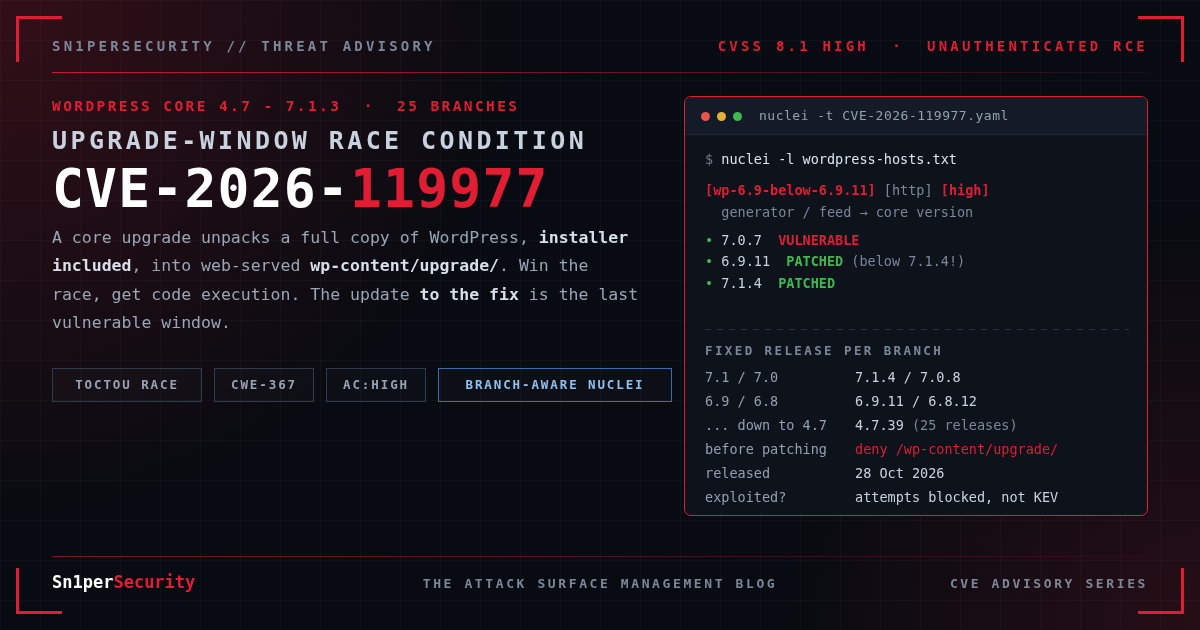

CVE-2026-119977 is an unauthenticated remote code execution flaw in WordPress Core 4.7.0 through 7.1.3. It sits in the one piece of WordPress that every site runs sooner or later: the core updater. During a full-package upgrade, WordPress unpacks a complete copy of itself, installer included, into a folder the web server will serve. An attacker who finds that copy and wins a race against the few seconds the upgrade takes can turn it into code execution. WordPress fixed it in 7.1.4 on 28 October 2026 and backported the fix to every branch down to 4.7. Wordfence, the CVE numbering authority for this one, has blocked attacks aimed at it since the day of release. Its advisory page runs a rolling 24-hour counter that press reports caught at roughly 60,000 to 70,000 on 30 and 31 October, and it still reads in the tens of thousands a week later.
There is an awkward detail that most coverage skips. The upgrade that installs the fix is unpacked by the old, vulnerable code, so the patch run is itself an exposure window. This post covers three things. First, a plain-English account of the bug, read from the 7.1.3 and 7.1.4 source rather than from press summaries. Second, a branch-aware Nuclei template, because “below 7.1.4” is the wrong test when 25 branches each got their own fix. Third, a way to find every WordPress install on your attack surface, including the ones nobody remembers deploying. The vulnerability was discovered and reported by Umut Bayram of Picus Security.
CVE-2026-119977 at a glance
- CVE-2026-119977: “WordPress Core 4.7.0 – 7.1.3 – Unauthenticated Upgrade-Window Staged-Installer Remote Code Execution” (Wordfence title). CWE-367, time-of-check time-of-use race condition. Some write-ups file it under CWE-362. The CNA record says 367.
- Impact: an unauthenticated attacker can execute code on the server during a core upgrade.
- CVSS 3.1: 8.1 High,
CVSS:3.1/AV:N/AC:H/PR:N/UI:N/S:U/C:H/I:H/A:H(Wordfence as CNA). NVD’s status is “Deferred”, so NVD has no score of its own. The WordPress project’s own advisory, GHSA-4w3m-c66w-69mg, rates it Low. More on that gap below. - Affected: WordPress 4.7.0 through 7.1.3, across 25 branches.
- Fixed: 7.1.4 (28 October 2026), with backports 7.0.8, 6.9.11, 6.8.12, 6.7.11 and so on down to 4.7.39. The full table is below. All 25 releases have shipped.
- Exploitation status: attempted exploitation in the wild, per Wordfence’s firewall telemetry. No confirmed compromises reported. No public proof of concept. Not in CISA KEV.
- Fix now: deny HTTP access to
/wp-content/upgrade/in your web server configuration, then update to your branch’s fixed release.
What is CVE-2026-119977?
When WordPress updates its own core, WP_Upgrader::unpack_package() extracts the downloaded zip into a working directory under wp-content/upgrade/. update_core() then copies the new files over the live site, and the working directory is deleted. The whole thing usually takes a few seconds.
Two properties of that working directory make up the bug.
It is web-served and, on many servers, listable. wp-content/upgrade/ sits inside the document root. WordPress ships an index.php in wp-content/, plugins/ and themes/ to stop directory listings, but before 7.1.4 it never put one in upgrade/. The upgrader’s cleanup step also deleted everything in that folder before each run, so an index file added by hand would not have survived.
Its name is mostly predictable. In 7.1.3 the directory name is the downloaded package’s temporary filename with .tmp stripped. wp_tempnam() builds that filename from the package’s base name plus six random characters, which gives something like wordpress-7.1.4-aB3dE9. Six characters cannot realistically be guessed inside a few-second window. A directory listing hands the name over directly. Wordfence describes the staging path as predictable and web-accessible. Our reading of the code is that “predictable” in practice means “a guessable prefix plus a suffix that a directory index reveals”. That is also why the fix closes both gaps.
What gets staged is the important part. A full or no-content core package is a complete WordPress tree. It contains wp-admin/setup-config.php, wp-admin/install.php and wp-config-sample.php, and it has no wp-config.php. To WordPress’s own setup screen, that staged copy looks like a fresh, unconfigured install that is waiting for someone to configure it.
The 7.1.4 fix in class-wp-upgrader.php and update-core.php makes three changes:
- The working directory name now ends in 16 random characters instead of six (
get_working_dir_name()). unpack_package()writes anindex.phpintowp-content/upgrade/and keeps it during cleanup, so the folder can no longer be listed.update_core()now refuses to copy awp-config.phpfrom the working directory into the live site. The code comment says why: one “could have been written to the working directory.”
That third change tells you what the realistic worst case is.
Why CVSS 8.1 and “Low” are both defensible
The GHSA rates this Low. Wordfence scores it 8.1. The gap comes from AC:H. An attacker has to catch a site mid-upgrade, find the staging directory and finish a multi-step setup before the upgrader deletes it. On most sites most of the time, there is nothing to attack. But core updates are scheduled, announced and largely automatic, so attackers know roughly when the windows open. Wordfence’s telemetry shows them polling targets for hours, waiting for one. Defend for the 8.1.
Affected and fixed versions
Every branch eligible for security fixes got its own release on the same day. A site on 6.9.11 is patched even though 6.9.11 is “below 7.1.4”. A site on 7.0.7 is vulnerable even though it is on a recent branch.
| Branch | Affected | Fixed |
|---|---|---|
| 7.1 | 7.1 – 7.1.3 | 7.1.4 |
| 7.0 | 7.0 – 7.0.7 | 7.0.8 |
| 6.9 | 6.9 – 6.9.10 | 6.9.11 |
| 6.8 | 6.8 – 6.8.11 | 6.8.12 |
| 6.7 | 6.7 – 6.7.10 | 6.7.11 |
| 6.6 | 6.6 – 6.6.10 | 6.6.11 |
| 6.5 | 6.5 – 6.5.13 | 6.5.14 |
| 6.4 | 6.4 – 6.4.13 | 6.4.14 |
| 6.3 | 6.3 – 6.3.13 | 6.3.14 |
| 6.2 | 6.2 – 6.2.14 | 6.2.15 |
| 6.1 | 6.1 – 6.1.15 | 6.1.16 |
| 6.0 | 6.0 – 6.0.17 | 6.0.18 |
| 5.9 | 5.9 – 5.9.19 | 5.9.20 |
| 5.8 | 5.8 – 5.8.18 | 5.8.19 |
| 5.7 | 5.7 – 5.7.20 | 5.7.21 |
| 5.6 | 5.6 – 5.6.22 | 5.6.23 |
| 5.5 | 5.5 – 5.5.23 | 5.5.24 |
| 5.4 | 5.4 – 5.4.24 | 5.4.25 |
| 5.3 | 5.3 – 5.3.26 | 5.3.27 |
| 5.2 | 5.2 – 5.2.29 | 5.2.30 |
| 5.1 | 5.1 – 5.1.27 | 5.1.28 |
| 5.0 | 5.0 – 5.0.30 | 5.0.31 |
| 4.9 | 4.9 – 4.9.34 | 4.9.35 |
| 4.8 | 4.8 – 4.8.33 | 4.8.34 |
| 4.7 | 4.7 – 4.7.38 | 4.7.39 |
Sources: GHSA-4w3m-c66w-69mg, the Wordfence record, and the NVD affected ranges. All three agree. We also confirmed that every fixed release is published on WordPress.org. WordPress names each branch’s first release 7.1, not 7.1.0, and those first releases are all affected.
Sites older than 4.7 are listed as unaffected by the CNA. They also receive no security fixes of any kind, so treat them as a bigger problem, not a smaller one. And remember the usual caveat: WordPress.org only actively supports the newest branch. The backports are a courtesy, and the right long-term answer for a site on 5.x is 7.1.
How the exploit chain works
We are deliberately not publishing a working exploit, request sequence or tooling here. This section covers the mechanism at the level a defender needs to judge exposure.
1. Observe:   GET /wp-content/upgrade/                     (directory index, during an upgrade)
2. Locate:    wordpress-<version>-[REDACTED]/wordpress/    (staged core tree)
3. Configure: staged installer pointed at [REDACTED]       (attacker-controlled database)
4. Escalate:  [REDACTED]                                   (administrator on the staged copy -> PHP execution)
The attacker polls wp-content/upgrade/ until an upgrade starts and the staging directory shows up in the listing. The staged tree has a setup script and no configuration file, so the attacker can run WordPress’s own installer against it and point it at a database they control. That makes them administrator of a WordPress instance running from your disk, under your web server’s user. An administrator session on that instance is enough to run PHP, and the PHP runs on your server.
Before 7.1.4 there was a second stage. If the attacker’s setup wrote a wp-config.php into the working directory, update_core() would copy it over the live site’s configuration along with the new core files. The production site would then be running against the attacker’s database. The 7.1.4 skip-list change blocks exactly this. Because update_core() is loaded from the new package, it applies even to the upgrade that installs 7.1.4.
The first stage is a different story. The upgrade from 7.1.3 to 7.1.4 is unpacked by 7.1.3’s unpack_package(), which still uses the short random suffix, writes no index.php and wipes the folder first. The patch run therefore opens one last vulnerable window. That is why the order of the remediation steps below matters.
For a related core flaw that did not need a race, see our wp2shell (CVE-2026-63030) advisory.
Am I exposed if WordPress auto-updates are enabled?
It depends on which package the update pulls. This is the most useful thing to know about this CVE, and we have not seen it covered elsewhere. Core_Upgrader::upgrade() picks from four package types:
| Package | When it is used | Stages the installer? |
|---|---|---|
partial |
Minor update within your branch (7.1.3 to 7.1.4), core files unmodified | No. 50 changed files only, no setup-config.php |
no_content |
Cross-branch upgrades (7.0.x to 7.1.4), sites whose core files fail the checksum pre-check | Yes |
new_bundled |
Upgrades that cross a bundled-theme boundary | Yes |
full |
Reinstalls and the fallback case | Yes |
We checked the 7.1.4 packages directly. The partial-3 zip offered to 7.1.3 sites holds 50 files and none of the installer scripts. The no-content zip holds all three. So a well-maintained 7.1.x site that auto-updates in-branch probably never staged an installer. Sites at higher risk are those taking a major-version jump, sites with modified core files (which fail the pre-check and fall back to a full package), and anyone who clicked “Re-install version”. The CNA’s “full-package core upgrades” wording points the same way. Treat this as a way to prioritize, not a reason to skip the patch. You do not control which package a given run selects, and the version template cannot see it from outside.
Am I affected? Quick manual checks
Authoritative check, on the server:
wp core version          # compare against your branch's row in the table above
wp core verify-checksums # also tells you whether you would fall back to a full package
Without WP-CLI, read $wp_version from wp-includes/version.php.
External fingerprint:
curl -s https://example.com/ | grep -o '<meta name="generator" content="WordPress [0-9.]*'
curl -s 'https://example.com/?feed=rss2' | grep -o '<generator>[^<]*'
Precondition check, one request:
curl -s -o /dev/null -w '%{http_code}\n' https://example.com/wp-content/upgrade/
A 403 or 404 is what you want. A 200 with an “Index of” page means any upgrade’s staging directory is visible to anyone who asks.
External checks have limits. Security plugins and themes often strip the generator tag, in which case you get silence, and silence means unknown, not clean. A version string can also be cached. A page cache or CDN can keep serving 7.1.3 markup after the site has updated, and the reverse can happen too. Trust wp core version over anything you read remotely.
Nuclei detection template for CVE-2026-119977
There is no official ProjectDiscovery template as of 3 November 2026. We checked http/cves/2026/CVE-2026-119977.yaml upstream and got a 404. Ours comes in two parts, and neither sends anything to a staged directory or attempts the race.
CVE-2026-119977.yaml reads the version from the generator meta tag, the RSS feed or the OPML generator comment. It then gates each branch against its own fix, with 25 matchers named after the branch and its fix release. The full template:
id: CVE-2026-119977

info:
  name: WordPress Core 4.7.0-7.1.3 - Unauthenticated Upgrade-Window Race Condition RCE (CVE-2026-119977)
  author: xer0dayz
  severity: high
  description: |
    WordPress Core 4.7.0 through 7.1.3 (CVE-2026-119977, CWE-367) unpacks full and
    no-content core upgrade packages into a web-served working directory under
    wp-content/upgrade/ whose name is a predictable prefix (wordpress-<version>-) plus a
    short random suffix, in a folder with no index file. Where directory listing is on, the
    staged copy, including its own unconfigured installer, is reachable by anyone during the
    seconds the upgrade takes, and an unauthenticated attacker who wins the race can reach
    code execution. WordPress 7.1.4 randomizes the name with a 16-character suffix, writes an
    index.php into wp-content/upgrade/, and refuses to copy a wp-config.php from the staging
    tree into the live site.
    This template is NON-DESTRUCTIVE: it fingerprints the core version from the generator
    meta tag, the RSS feed generator, or the OPML generator comment, and flags versions below
    their own branch's backport (7.1.x < 7.1.4, 7.0.x < 7.0.8, ... 4.7.x < 4.7.39). A naive
    "< 7.1.4" check is wrong because every branch back to 4.7 received a fix. It sends no
    request to wp-content/upgrade/ and never attempts the race. Pair it with
    CVE-2026-119977-upgrade-dir-exposure.yaml for the directory-listing precondition.
  remediation: |
    Update to the fixed release for your branch: 7.1.4, 7.0.8, 6.9.11, 6.8.12, 6.7.11,
    6.6.11, 6.5.14, 6.4.14, 6.3.14, 6.2.15, 6.1.16, 6.0.18, 5.9.20, 5.8.19, 5.7.21, 5.6.23,
    5.5.24, 5.4.25, 5.3.27, 5.2.30, 5.1.28, 5.0.31, 4.9.35, 4.8.34 or 4.7.39.
    The upgrade TO the fix is unpacked by the old, vulnerable code, so deny HTTP access to
    /wp-content/upgrade/ in the web server or vhost configuration BEFORE updating. A rule
    placed inside wp-content/upgrade/ itself is deleted by the upgrader's cleanup step.
    Confirm with: wp core version.
  reference:
    - https://www.wordfence.com/threat-intel/vulnerabilities/id/4b4da0cf-d9f4-47c4-a0e8-6c4dc5a6f250
    - https://github.com/WordPress/wordpress-develop/security/advisories/GHSA-4w3m-c66w-69mg
    - https://wordpress.org/news/2026/10/wordpress-7-1-4/
    - https://nvd.nist.gov/vuln/detail/CVE-2026-119977
    - https://sn1persecurity.com/wordpress/cve-2026-119977-wordpress-rce-detection-with-sn1per/
  classification:
    cvss-metrics: CVSS:3.1/AV:N/AC:H/PR:N/UI:N/S:U/C:H/I:H/A:H
    cvss-score: 8.1
    cve-id: CVE-2026-119977
    cwe-id: CWE-367
  metadata:
    verified: false
    max-request: 3
    vendor: wordpress
    product: wordpress
    shodan-query: http.component:"WordPress"
  tags: cve,cve2026,wordpress,wp,rce,race-condition,toctou,unauth

http:
  - method: GET
    path:
      - "{{BaseURL}}/"
      - "{{BaseURL}}/?feed=rss2"
      - "{{BaseURL}}/wp-links-opml.php"

    stop-at-first-match: true
    redirects: true
    max-redirects: 2

    matchers-condition: or
    matchers:
      - type: dsl
        name: wp-7.1-below-7.1.4
        dsl:
          - "compare_versions(version, '>= 7.1.0', '< 7.1.4')"

      - type: dsl
        name: wp-7.0-below-7.0.8
        dsl:
          - "compare_versions(version, '>= 7.0.0', '< 7.0.8')"

      - type: dsl
        name: wp-6.9-below-6.9.11
        dsl:
          - "compare_versions(version, '>= 6.9.0', '< 6.9.11')"

      - type: dsl
        name: wp-6.8-below-6.8.12
        dsl:
          - "compare_versions(version, '>= 6.8.0', '< 6.8.12')"

      - type: dsl
        name: wp-6.7-below-6.7.11
        dsl:
          - "compare_versions(version, '>= 6.7.0', '< 6.7.11')"

      - type: dsl
        name: wp-6.6-below-6.6.11
        dsl:
          - "compare_versions(version, '>= 6.6.0', '< 6.6.11')"

      - type: dsl
        name: wp-6.5-below-6.5.14
        dsl:
          - "compare_versions(version, '>= 6.5.0', '< 6.5.14')"

      - type: dsl
        name: wp-6.4-below-6.4.14
        dsl:
          - "compare_versions(version, '>= 6.4.0', '< 6.4.14')"

      - type: dsl
        name: wp-6.3-below-6.3.14
        dsl:
          - "compare_versions(version, '>= 6.3.0', '< 6.3.14')"

      - type: dsl
        name: wp-6.2-below-6.2.15
        dsl:
          - "compare_versions(version, '>= 6.2.0', '< 6.2.15')"

      - type: dsl
        name: wp-6.1-below-6.1.16
        dsl:
          - "compare_versions(version, '>= 6.1.0', '< 6.1.16')"

      - type: dsl
        name: wp-6.0-below-6.0.18
        dsl:
          - "compare_versions(version, '>= 6.0.0', '< 6.0.18')"

      - type: dsl
        name: wp-5.9-below-5.9.20
        dsl:
          - "compare_versions(version, '>= 5.9.0', '< 5.9.20')"

      - type: dsl
        name: wp-5.8-below-5.8.19
        dsl:
          - "compare_versions(version, '>= 5.8.0', '< 5.8.19')"

      - type: dsl
        name: wp-5.7-below-5.7.21
        dsl:
          - "compare_versions(version, '>= 5.7.0', '< 5.7.21')"

      - type: dsl
        name: wp-5.6-below-5.6.23
        dsl:
          - "compare_versions(version, '>= 5.6.0', '< 5.6.23')"

      - type: dsl
        name: wp-5.5-below-5.5.24
        dsl:
          - "compare_versions(version, '>= 5.5.0', '< 5.5.24')"

      - type: dsl
        name: wp-5.4-below-5.4.25
        dsl:
          - "compare_versions(version, '>= 5.4.0', '< 5.4.25')"

      - type: dsl
        name: wp-5.3-below-5.3.27
        dsl:
          - "compare_versions(version, '>= 5.3.0', '< 5.3.27')"

      - type: dsl
        name: wp-5.2-below-5.2.30
        dsl:
          - "compare_versions(version, '>= 5.2.0', '< 5.2.30')"

      - type: dsl
        name: wp-5.1-below-5.1.28
        dsl:
          - "compare_versions(version, '>= 5.1.0', '< 5.1.28')"

      - type: dsl
        name: wp-5.0-below-5.0.31
        dsl:
          - "compare_versions(version, '>= 5.0.0', '< 5.0.31')"

      - type: dsl
        name: wp-4.9-below-4.9.35
        dsl:
          - "compare_versions(version, '>= 4.9.0', '< 4.9.35')"

      - type: dsl
        name: wp-4.8-below-4.8.34
        dsl:
          - "compare_versions(version, '>= 4.8.0', '< 4.8.34')"

      - type: dsl
        name: wp-4.7-below-4.7.39
        dsl:
          - "compare_versions(version, '>= 4.7.0', '< 4.7.39')"

    extractors:
      # Anchored to the three generator markers only. A loose /wp-includes/...?ver= regex
      # also captures bundled library versions (jQuery 3.7.1), the extractor then binds a
      # list, and compare_versions() silently returns false.
      - type: regex
        name: version
        part: body
        group: 1
        internal: true
        regex:
          - '(?:<meta name="generator" content="WordPress |<generator>https?://wordpress\.org/\?v=|<!-- generator="WordPress/)([0-9]+\.[0-9]+(?:\.[0-9]+)?)'

      - type: regex
        name: wordpress-version
        part: body
        group: 1
        regex:
          - '(?:<meta name="generator" content="WordPress |<generator>https?://wordpress\.org/\?v=|<!-- generator="WordPress/)([0-9]+\.[0-9]+(?:\.[0-9]+)?)'
The second file, CVE-2026-119977-upgrade-dir-exposure.yaml, is info severity. It sends one GET to /wp-content/upgrade/ and reports an Apache, nginx, LiteSpeed or IIS directory index there, plus any wordpress-* staging directory names the index happens to show. It is exposure context, not a vulnerability on its own. A vulnerable version together with a listable upgrade folder is the pairing to fix first.
nuclei -t CVE-2026-119977.yaml -t CVE-2026-119977-upgrade-dir-exposure.yaml -l wordpress-hosts.txt
A match reads:
[CVE-2026-119977:wp-6.9-below-6.9.11] [http] [high] https://blog.example.com/ ["6.9.10"]
Why the version regex is so narrow
Earlier WordPress templates, ours included, fell back to /wp-includes/...?ver= asset strings. On a homepage that loads jQuery, that regex also captures 3.7.1. Nuclei then binds the extracted variable to a list, and compare_versions() quietly returns false. The result is a false negative on exactly the sites with the most normal-looking homepages. This template captures only the three generator markers. Our test homepage loads jQuery on purpose, and the template passed 217 boundary checks against it: all 25 branches at fix-minus-one, at the fix, at the two-part x.y first release and above the fix, plus feed-only, OPML-only and stripped-generator variants.
Two blind spots, stated plainly
A stripped generator produces silence. Many hardening plugins remove all three markers. No match means “unknown, check wp core version“, not “patched”.
The version cannot tell you about the window. A 7.1.4 site that was attacked during its own upgrade to 7.1.4 reports as patched. If a site was unpatched on 28 October and its upgrade folder was listable, check the hunting section below whatever the template says.
Detecting CVE-2026-119977 across your attack surface with Sn1per
WordPress is rarely one site. It is the corporate site, plus the campaign microsite from two years ago, the regional blog, the careers page an agency built, and the staging copy on a subdomain that was never taken down. The well-known sites will be patched by the end of the week. The forgotten ones still run 5.8 with directory listing on, and nobody is watching their upgrade windows. So treat this as a discovery problem before a scanning problem.
# Discover first: subdomains, certificate transparency, ports, services
sniper -t example.com -m recon -w cve-2026-119977

# Web pass: runs both templates against every HTTP and HTTPS port found
sniper -t www.example.com -m web -w cve-2026-119977

# Sweep a known WordPress fleet
sniper -f wordpress-hosts.txt -m webscan -w cve-2026-119977
Put both templates in Sn1per’s curated Nuclei directory and the web pass picks them up with no configuration change. Findings land in the workspace with the matcher name, so the branch and its fix release are visible without opening anything. Pull the high-severity version hits and the info-level listing hits from a Professional or Enterprise install, and fix the hosts that appear in both first:
curl -sk -H "X-API-Key: $SN1PER_API_KEY" \
  "https://sn1per.local/pro/api.php?action=vulnerabilities&workspace=cve-2026-119977" \
  | jq -r '.[] | select(.name | test("119977")) | [.host, .severity, .name] | @tsv'
A note on where this scan should run. Its output is a list of your sites that are vulnerable to unauthenticated code execution and are known to be targeted right now. That is not a document you want generated and stored in someone else’s multi-tenant cloud. Sn1per runs on your hardware and the results stay there. The longer version of that argument is in our guide to external attack surface management with Sn1per.
Which Sn1per edition fits
| Capability | Community | Professional 2026 | Enterprise |
|---|---|---|---|
| Run the CVE-2026-119977 templates | Yes | Yes | Yes |
| Curated Nuclei set maintained for you | Partial | Yes | Yes |
| Workspaces and scan history | Basic | Yes | Yes |
| Web UI with asset risk ranking | No | Yes | Yes |
| JSON API for finding export | No | Yes | Yes |
| Scheduled recurring surface sweeps | No | Limited | Yes |
| Multi-user, delegated workspaces | No | No | Yes |
To answer “do we run a vulnerable WordPress anywhere” once, Community plus the templates is enough. WordPress core ships security releases several times a year, though, and the sites that bite you are the ones that fall off the list between sweeps. That is what continuous attack surface testing is for. The Professional vs Enterprise comparison covers where scheduling and delegation start to matter.
Remediation and mitigation
Order matters here, because the update to the fix is the last vulnerable upgrade.
- Deny HTTP access to
/wp-content/upgrade/first. WordPress only touches this folder through the filesystem and never serves it, so blocking it breaks nothing. Put the rule in the web server or vhost configuration, or inwp-content/.htaccess. A rule placed insidewp-content/upgrade/is useless, because the vulnerable upgrader deletes everything in that folder when it starts.
– nginx:location ^~ /wp-content/upgrade/ { deny all; }. The^~makes this prefix win over your\.php$location.
– Apache:<Directory "/var/www/example/wp-content/upgrade"> Require all denied </Directory>in the vhost, orRewriteEngine OnplusRewriteRule ^upgrade/ - [F,L]inwp-content/.htaccess.
– Confirm it with the one-linecurlabove. You want a 403. - Then update to your branch’s fixed release. That means 7.1.4, 7.0.8, 6.9.11 and so on, per the table. Run it yourself, now, with the block in place, rather than waiting for a background update at an unknown hour. On a fleet, a host showing “update available” in a dashboard has not been updated. Verify with
wp core versionon each one. - Turn off directory indexes everywhere. Apache
Options -Indexes, nginxautoindex off. A listable upgrade folder is what turns six random characters into no protection at all, and the same setting exposes backups and logs elsewhere. - Keep the deny rule after patching. 7.1.4 makes the folder unlistable and the name unguessable, but nothing needs to reach
wp-content/upgrade/over HTTP, ever. Keep the rule as defence in depth for the next upgrader bug. - Plan major-version jumps. Cross-branch upgrades always use a package that stages the installer. If you have to stay on an old branch for a while, its backport is fine. When you do move to 7.1, do it in a maintenance window with the block in place.
- Run
wp core verify-checksums. Modified core files push a site off the partial-package path and into a full staging run. They are also worth knowing about for their own sake.
If you were unpatched: hunting for exploitation
If a site ran a core upgrade on or after 28 October without the block in place, check it. Start with the access logs:
# Any request into the upgrade folder. On a healthy site there should be none.
zgrep -hE '"(GET|POST) [^"]*/wp-content/upgrade/' /var/log/nginx/access.log* /var/log/apache2/access.log* 2>/dev/null

# The ones that matter: an installer or setup script executed from a staged tree
zgrep -hE '/wp-content/upgrade/[^" ]*/wp-admin/(setup-config|install)\.php' /var/log/nginx/access.log* /var/log/apache2/access.log* 2>/dev/null
A 200 response on the second pattern is the one to act on. Many 403 and 404 responses on the first show that someone was polling. That fits the scanning Wordfence reports, and on its own it does not mean a compromise.
Then check the site itself. Look at wp user list --role=administrator for accounts nobody recognizes, and at wp plugin list for plugins nobody installed. Check DB_HOST in wp-config.php against what it should be: an off-box database host you do not recognize matches the configuration-swap stage that 7.1.4 closes. Look for PHP files under wp-content/ and the web root that you did not put there, and run wp core verify-checksums. Anything that ran as the web server user could read wp-config.php. If you find signs of compromise, rotate the database password and the authentication salts, not just the admin passwords.
Frequently asked questions
What is CVE-2026-119977?
It is an unauthenticated remote code execution vulnerability in WordPress Core 4.7.0 through 7.1.3. During a full-package core upgrade, WordPress unpacked a complete copy of itself into a web-reachable folder under wp-content/upgrade/. That copy included an unconfigured installer. An attacker who found the folder and won the race against the upgrade could get code execution. Wordfence scores it 8.1 High (CWE-367).
Which WordPress versions fix CVE-2026-119977?
7.1.4, and the backports released the same day for every branch to 4.7: 7.0.8, 6.9.11, 6.8.12, 6.7.11, 6.6.11, 6.5.14, 6.4.14, 6.3.14, 6.2.15, 6.1.16, 6.0.18, 5.9.20, 5.8.19, 5.7.21, 5.6.23, 5.5.24, 5.4.25, 5.3.27, 5.2.30, 5.1.28, 5.0.31, 4.9.35, 4.8.34 and 4.7.39. You are patched if you are at or above the fix for your own branch.
Is CVE-2026-119977 being exploited in the wild?
Exploitation attempts, yes. Wordfence reports blocking tens of thousands of attacks a day aimed at this flaw since 28 October, with attackers polling sites for upgrade windows. No confirmed successful compromises have been reported, there is no public proof of concept, and it is not in CISA’s KEV catalog as of 3 November 2026.
Is it safe to delete or block the wp-content/upgrade folder?
Yes. WordPress creates it when it needs it and only ever uses it through the filesystem, never over HTTP. Deleting it between updates is harmless. Blocking HTTP access to it permanently is recommended. Put the block in your server or vhost configuration, not in a file inside the folder, because the upgrader wipes the folder’s contents.
Is the CVE-2026-119977 Nuclei template safe to run in production?
Yes. The version template sends three ordinary GET requests that any browser or feed reader makes: the homepage, the RSS feed and the OPML file. The exposure template sends one GET to /wp-content/upgrade/. Neither requests anything inside a staging directory, touches an installer or tries to win the race. Neither changes state on the target.
Closing
CVE-2026-119977 is a reminder that the update mechanism is attack surface too, and that a staging copy of an application is still the application. The fix is small and sensible, but it only protects the next upgrade, not the one that installs it. So block the folder, then patch, and only then check whether anything already went through. Run the templates or a Sn1per sweep across your whole surface, not just the sites you already know about. The forgotten 5.x blog with directory listing on is the one this bug was made for.
Tags: #cve-2026-119977 #wordpress-rce #wordpress-vulnerability #wordpress-security #wordpress-7-1-4 #race-condition #nuclei-template #unauthenticated-rce #sn1per #sn1per-pro #attack-surface-management #2026
References: Wordfence vulnerability record · GHSA-4w3m-c66w-69mg · WordPress 7.1.4 release post · NVD CVE-2026-119977